

Tracking ClickBank sales as a vendor
This guide is for product owners selling on ClickBank who want to track their own sales.
There are two ways to record ClickBank sales in FunnelFlux:
- Action links (this guide). Your thank-you page loads a FunnelFlux action link or the conversion iFrame, and that records the conversion. You do not need the IPN.
- Instant notification (IPN). ClickBank sends every transaction to your tracker. FunnelFlux records a conversion only when the order’s tracking code is a FunnelFlux hit ID. As an affiliate you pass the hit ID in
tid; as a vendor you pass it invtid. Tracking ClickBank flows shows how to inject the hit ID into your payment links.
In this guide, vtid holds a label you choose, not a hit ID, so the IPN cannot match these sales.
Use the action-link method below, or switch to the flows guide if you want the IPN to record sales, rebills and refunds.
The IPN setup steps are at the end of this page, in ClickBank instant notification (IPN) setup.
If you use PitchPlus upsell flows, also read Tracking ClickBank upsell flows.
Before you start
Section titled “Before you start”Create a traffic source, landers and offers in FunnelFlux.
Your flow includes a purchase form, so use HTTPS for all landers and offers. Your tracker domain needs a valid SSL certificate.
The traffic source
Section titled “The traffic source”Create a traffic source called “ClickBank Vendor Account” or similar.
Add hop and vtid as custom tracking fields, plus any other fields you use in your own campaigns.
hop records which affiliate sent the traffic, when it is not you.
vtid is the vendor tracking ID, the vendor version of the affiliate tid.
ClickBank and FunnelFlux both record it.
Configuring your funnel
Section titled “Configuring your funnel”This example promotes a single product with no upsells.
You need:
- a lander for your ClickBank pitch page
- an offer for the checkout, which uses your ClickBank pay link
- a lander for the thank-you page that buyers reach after the order
Your funnel looks like this:

Right-click the traffic node and choose Send Traffic Here.
In the Funnel URL window, select your ClickBank traffic source and copy the link.
The Funnel URL window has no redirect setting.
In the pitch page lander’s settings, set Redirect Type to 307 Temporary Redirect or 301 Moved Permanently.
The only core parameter this link needs is flux_fts, so your pitch page URL in ClickBank looks like this:
https://your-tracker.com/?flux_fts=xxxxWhen an affiliate sends traffic through a HopLink, ClickBank appends hop=affiliate_id to the pitch page URL.
Your traffic source expects hop, so FunnelFlux records it.
When you send traffic yourself, append vtid=something to the link.
ClickBank and FunnelFlux both record it.
Getting action links
Section titled “Getting action links”The pitch page and the thank-you page both use action links.
An action link with organic parameters still works when the visitor has no FunnelFlux cookie. It looks like this:
https://your-tracker.com/?flux_action=1&flux_f=xxxx&flux_ffn=xxxxflux_f is the funnel ID and flux_ffn is the node the action starts from.
To build this link, open Links > System Links and copy the Action click URL.
Replace ACTION-NUMBER with the action number on the connection between the two nodes.
Append &flux_f= with the Funnel ID from Funnel settings and &flux_ffn= with the ID of the node the action starts from.
To find a node’s ID, right-click the node, choose Send Traffic Here, and copy the number at the start of 3. Node.
Without flux_f and flux_ffn, the link only works for visitors who already have a FunnelFlux cookie.
The pitch page
Section titled “The pitch page”On your pitch page, link your call-to-action buttons to the action link for Action 1 between the pitch page and the checkout offer.
You could link straight to the ClickBank pay link, but the action link records click-throughs and lets you change the checkout in FunnelFlux.
The checkout offer
Section titled “The checkout offer”Set the checkout offer URL to your ClickBank pay link:
https://ITEM.VENDOR.pay.clickbank.net/Set the offer’s Redirect Type to 301 Moved Permanently.
To pass the vtid from your entrance link on to ClickBank, add it as a token:
https://ITEM.VENDOR.pay.clickbank.net/?vtid={trackingfield-vtid}ClickBank supports other pay link parameters, such as cbskin for custom order forms.
If you use them, create a separate offer for each value and hard-code the parameter, so each version reports separately.
The thank-you page
Section titled “The thank-you page”In your ClickBank product settings, set the thank-you page to the action link between the checkout offer and the thank-you lander.
To record the conversion, use one of these options:
- Right-click the action between the checkout offer and the thank-you lander and tick Is conversion. Each load of the thank-you page then counts as a conversion.
- Leave Is conversion off and put the Conversion iFrame from System Links on your thank-you page. You can add details such as payout and transaction ID to the iFrame
src, which gives you more control.
If a membership system such as MemberMouse or aMember is your thank-you page, use its URL as the thank-you lander URL. It works like any other thank-you page.
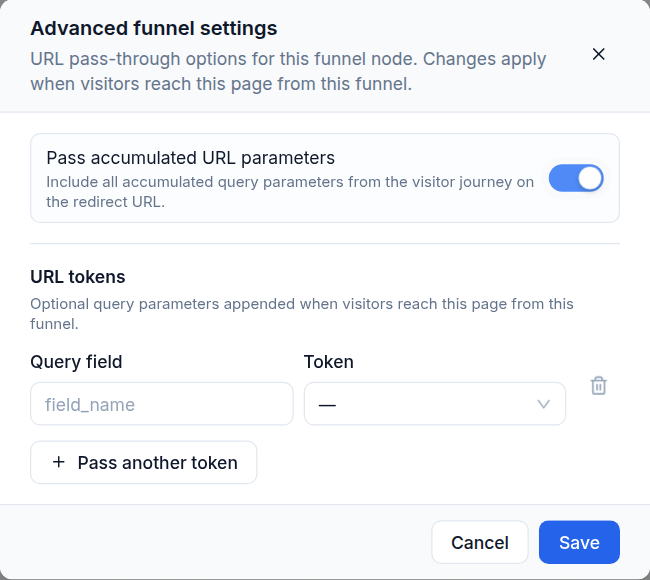
If ClickBank passes parameters that the thank-you page needs, keep them on the action link. Then right-click the thank-you lander, choose Advanced Settings, and turn on Pass accumulated URL parameters.
Reading the data
Section titled “Reading the data”- The
hoptracking field shows which affiliates sent traffic to your offer. - The
vtidtracking field matches the VTID in ClickBank’s reports, so your own traffic lines up in both systems.
ClickBank instant notification (IPN) setup
Section titled “ClickBank instant notification (IPN) setup”Use these steps to give ClickBank the FunnelFlux notification URL and secret key. ClickBank conversion tracking as an affiliate and Tracking ClickBank flows both use this setup.
FunnelFlux reads the tracking codes ClickBank attaches to each order. A sale, rebill or test sale counts as a conversion only when a tracking code is a FunnelFlux hit ID. Refunds and chargebacks reverse the matching conversion. Notifications without a matching hit ID are ignored, so turning on the IPN does not double-count sales you track with action links.
Get the notification URL and secret key
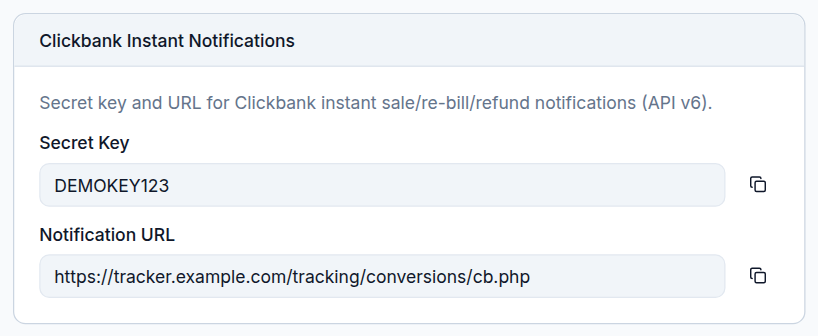
Section titled “Get the notification URL and secret key”Go to the System Links page. Open the Clickbank Instant Notifications card. Copy the Secret Key and the Notification URL. You need both.
Add the IPN details in ClickBank
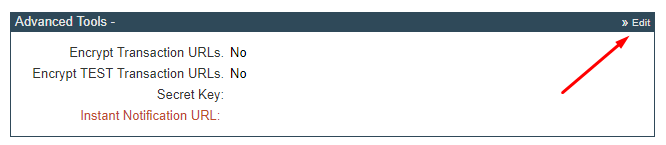
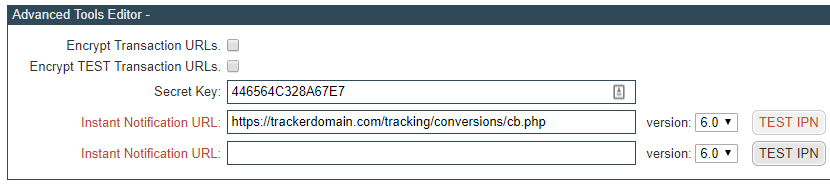
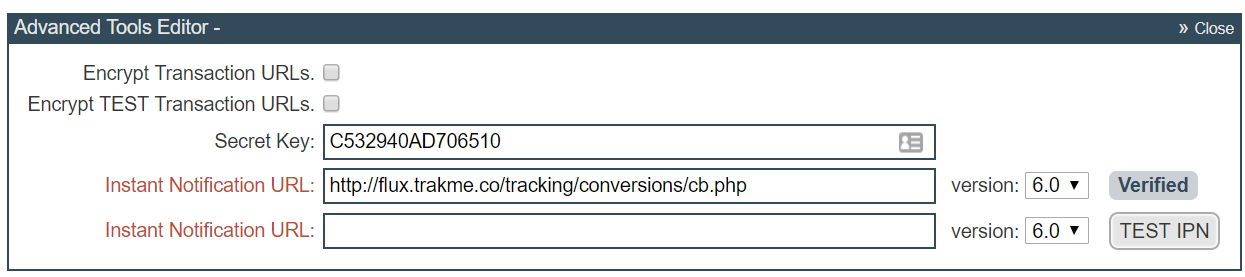
Section titled “Add the IPN details in ClickBank”Log in to ClickBank and select your account. Go to Vendor Settings > My Site, find the Advanced Tools section and click Edit.
If the instant notification fields are not available yet, click Request Access next to the Instant Notification URL field and complete ClickBank’s form first.
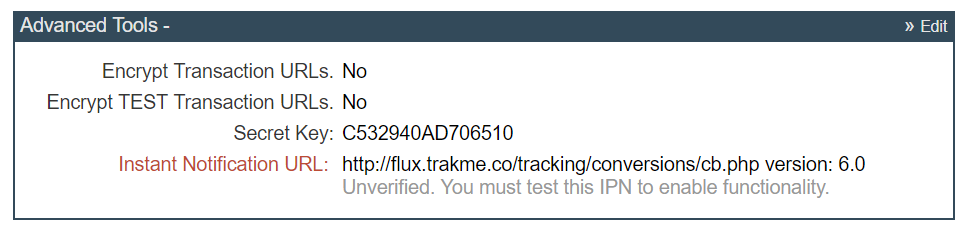
Paste the FunnelFlux secret key into the Secret Key field.
Paste the notification URL into the Instant Notification URL field.
FunnelFlux does not check the INS version.
It decrypts the JSON notification and reads its transactionType, receipt, totalAccountAmount and trackingCodes fields, so if ClickBank asks for a version, choose one that sends encrypted JSON with those fields.
Click TEST IPN next to the URL.
When the test succeeds, ClickBank marks the URL as Verified.
If it does not, check that you copied the URL correctly and that your tracker domain has a valid SSL certificate.
Click Save Changes.
ClickBank’s own steps are in its Instant Notification Service article.