

The system settings area
System Settings holds the install-wide options for FunnelFlux. Only admin users can open it.
Sign in at https://yourdomain.com/admin/login.php.
Click the settings (gear) icon in the top bar, then System Settings.
A few older settings are only in the classic interface at /admin/; they are listed at the end of this page.
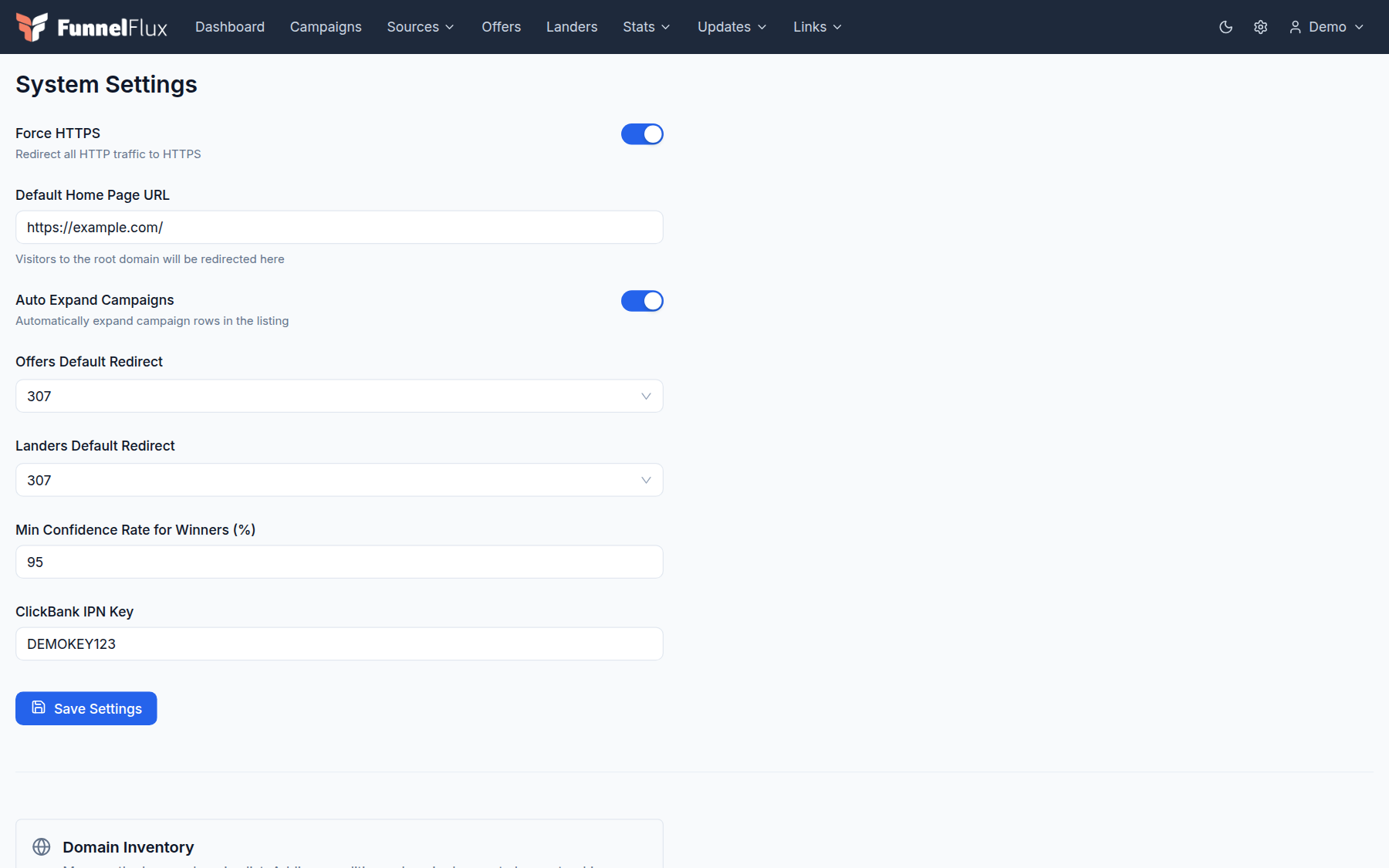
Change what you need, then click Save Settings.
Force HTTPS
Section titled “Force HTTPS”Force HTTPS makes FunnelFlux build the links and URLs it generates with https://.
The classic interface at /admin/ also switches your browser to https://.
The hint under the toggle reads “Redirect all HTTP traffic to HTTPS”, but FunnelFlux does not redirect visitors from HTTP to HTTPS; do that in Cloudflare or on your server.
See How to configure FunnelFlux to force usage of SSL.
Turn it on only after SSL is working on your domain. If the certificate is not valid, you can lock yourself out of the dashboard. You would then have to get past the browser’s certificate warning to sign in and turn the setting off.
Default Home Page URL
Section titled “Default Home Page URL”Visitors who load the root of your domain, such as https://yourdomain.com, are redirected to this URL.
Without it, the root shows a blank “404” page.
Use it if the tracker domain is tied to a brand and you want the root to send people somewhere useful. The value can be any URL, including a FunnelFlux link.
The same URL is used when a lander click has no usable visitor identity. That happens when cookies are blocked and the action link carries no session information, so FunnelFlux cannot tell which visitor or funnel the click belongs to.
Auto Expand Campaigns
Section titled “Auto Expand Campaigns”This expands campaign rows on the Campaigns page so their funnels are visible.
Turn it off if you have many campaigns and funnels.
Offers Default Redirect and Landers Default Redirect
Section titled “Offers Default Redirect and Landers Default Redirect”Offers and landers can use 307 Temporary Redirect, 301 Permanent Redirect, Ultimate Meta Refresh (UMR), or Fluxify (reverse proxy).
These two settings choose which mode is selected by default when you create an offer or a lander in the classic interface at /admin/, or through the data API.
The V2 lander and offer form always starts on 307 Temporary Redirect, so pick the type you want there.
See Redirect types for what each mode does.
ClickBank IPN Key
Section titled “ClickBank IPN Key”If you use ClickBank, put your ClickBank IPN key here. See ClickBank conversion tracking as an affiliate.
Domains
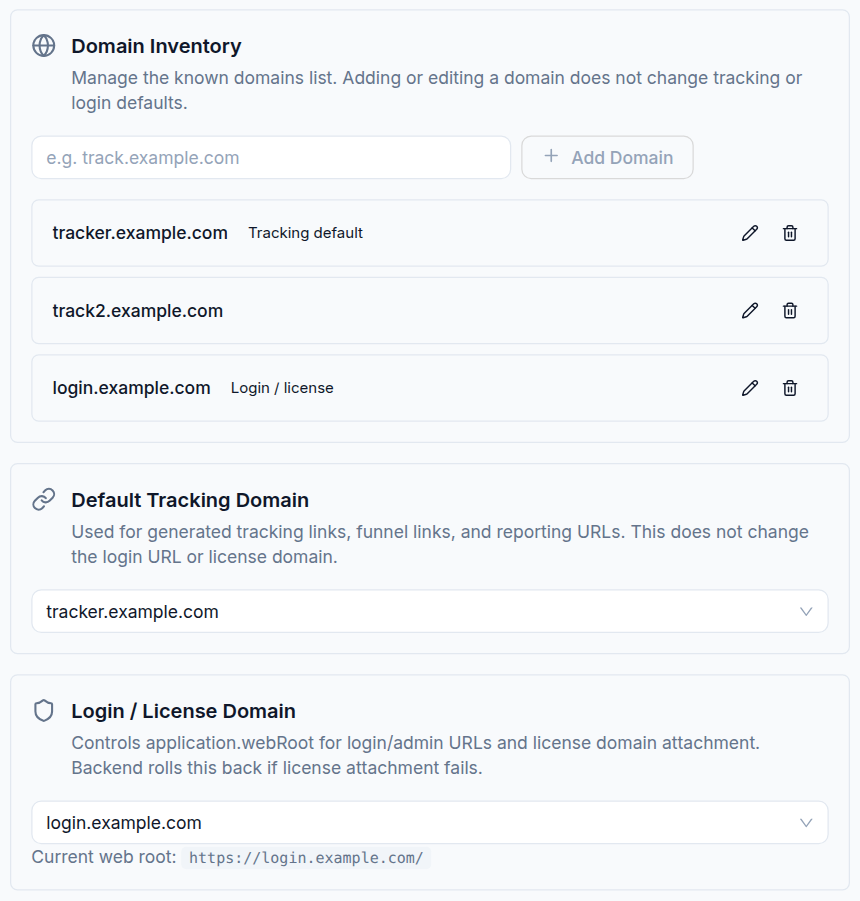
Section titled “Domains”Below the settings form you manage the domains this install uses.
- Domain Inventory lists your domains. Add one by typing it, for example
track.example.com, and edit or delete existing ones from the list. - Default Tracking Domain is the domain used for tracking links by default.
- Login / License Domain is the domain used for signing in and for your license.
Each domain must already point to your server. See Use multiple domains using CNAMEs.
Classic interface only
Section titled “Classic interface only”These settings are not in V2 System Settings.
Open System Settings in the classic interface at /admin/ to change them.
Default Drilldown
Section titled “Default Drilldown”Several places open a report when you click an item, including landers, offers, traffic sources, and offer sources. That report is already filtered to the item you clicked.
Default Drilldown chooses whether that report opens in flat or tree mode.
API Key
Section titled “API Key”This is the key for the data and stats API.
Set it to a value you choose, and avoid unusual symbols in it. The key saves when you click outside the box, or a few seconds after you stop typing.
License Key
Section titled “License Key”Use this field to change the license key, for example when you have more than one FunnelFlux key and need to assign a specific key to this install. Click Assign new license key to change it.
IP Anonymizer
Section titled “IP Anonymizer”This sets which visitor IPs are anonymized: All IPs, EU IPs, or Disabled. A new install uses All IPs. You can override it per funnel in the funnel’s advanced settings in the classic interface.