

What are accumulated URL parameters?
Accumulated URL parameters are the parameters FunnelFlux collects from your funnel links as a visitor moves through a funnel. You choose which pages receive them.
Pass accumulated parameters to a page
Section titled “Pass accumulated parameters to a page”In the funnel editor, right-click a lander or offer node and click Advanced Settings. Turn on Pass accumulated URL parameters, click Save, then save the funnel.
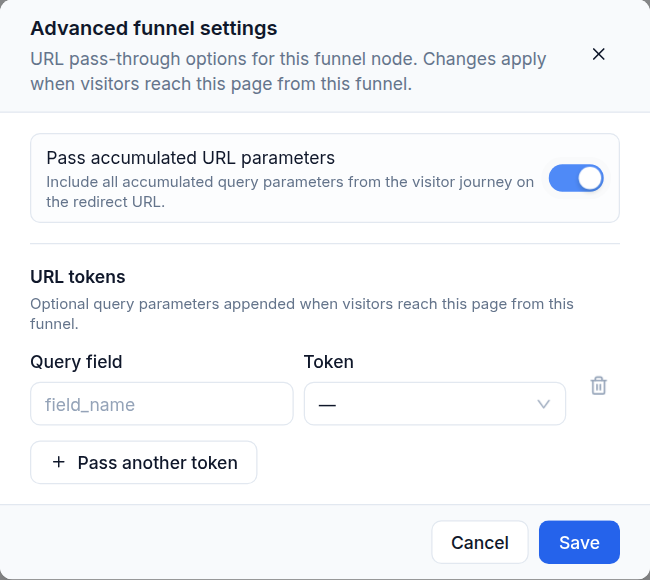
It is off by default.
Turn it on and, when a visitor reaches that page, FunnelFlux appends every parameter from your funnel link to that page URL.
For example, the funnel link is:
yourdomain.com/?flux_fts=Xhjdsh22&flux_cpe=1&yourparam1=abc&yourparam2=defThe lander is set up at:
yourdomain.com/lander1.phpWhen a visitor of that funnel reaches this lander node, FunnelFlux loads it at:
yourdomain.com/lander1.php?yourparam1=abc&yourparam2=defAdd your own parameters for a funnel or campaign
Section titled “Add your own parameters for a funnel or campaign”Besides the parameters passed in the funnel link, you can add fixed parameters for a funnel or a whole campaign.
- For one funnel, open the funnel, click the settings (gear) icon, expand Advanced settings, and fill in Accumulate these URL params.
- For every funnel in a campaign, edit the campaign and use Advanced settings (all funnels in this campaign).
Enter one key=value pair per line.
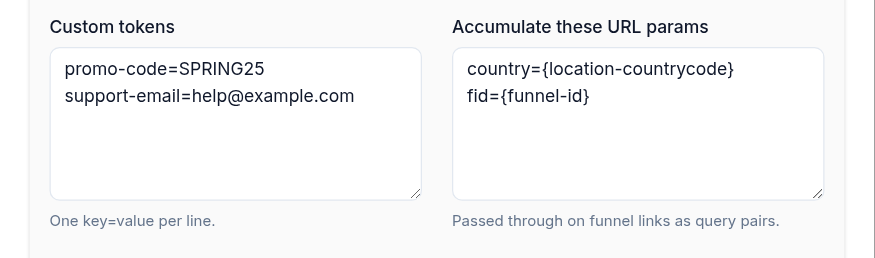
Those extra parameters apply only to traffic inside that funnel or campaign. Use them when a funnel needs specific information, but you do not want that information hard-coded into the lander URL in the lander config. To read a single passed value in a URL instead of passing them all, use buffer tokens. See What is the FunnelFlux buffer and how to use it.