

Using the no-redirect feature to send traffic to your funnels without redirect links
You can send traffic directly to your landing pages or your own offers, with no redirect link, and still track the visit.
The regular flow is:
- Visitor
- Tracking link redirect
- Your lander
- Your offer
With the no-redirect option, the flow is:
- Visitor
- Your lander
- Your offer
Place a piece of JavaScript on the lander.
You skip the redirect, which some traffic sources prefer. You can also host the landers on a CDN, so the page loads faster for the visitor.
The downside is that no tracker sits in the middle to make routing decisions from user info, or to split-test landers. If you need rotation, you can host the landers on a server and use PHP to rotate them. That choice is yours.
The JavaScript itself is covered in The features and functions of FunnelFlux’s on-page Javascript tracking. Start with this article.
How to use the no-redirect feature
Section titled “How to use the no-redirect feature”The direct way to add the JavaScript is the Universal tracking script for that funnel.
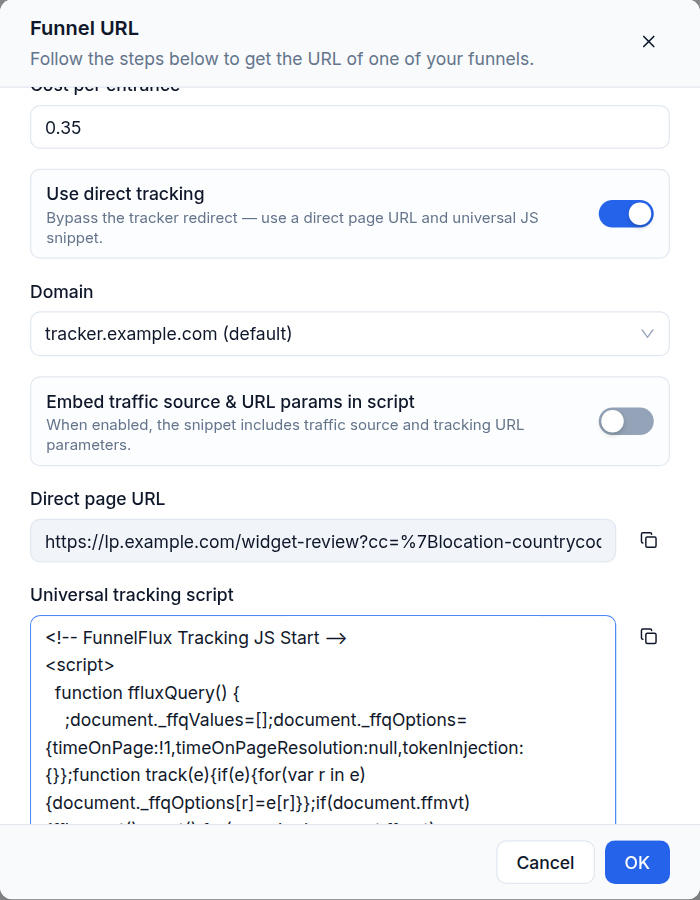
In the Dashboard, open the funnel, right-click the lander node and click Send Traffic Here, then turn on Use direct tracking and copy the Universal tracking script.
The steps are in Get a direct page URL and script from the Funnel URL window below.
The funnel-level JavaScript box in the classic /admin/ funnel editor holds the same kind of script.
Place this code in the <head> section of that node’s landing page (with the classic funnel-level script, of each landing page you use in the funnel).
Place it before the closing </head> tag.
The script you copy from Send Traffic Here names the node: it sets flux_fn, the ID of the node you right-clicked, so FunnelFlux knows which node and funnel the visitor is on.
The funnel-level script in the classic editor sets flux_f, the funnel ID, instead, and FunnelFlux works out the node from the URL visited.
Unless you turn on Embed traffic source & URL params in script, the Universal tracking script does not tell FunnelFlux a traffic source and does not pass traffic source parameters.
You can pass all of those in the URL for the JavaScript to record. The next section covers that.
How to send traffic to your lander
Section titled “How to send traffic to your lander”The lander now has the JavaScript. To get the same data a normal tracking link would record, build the link, then move its query string onto the lander URL.
Right-click a node in your funnel and click Send Traffic Here. In the Funnel URL window, pick the traffic source and any other details, then copy the link. It looks something like this:
https://tracker.com/?flux_fts=qppqpcloooaootptzpeqie0eca&campaign={campaign}&publisher={site}&ad={title}&creative={thumbnail}&angle={angle}This example is a Taboola campaign. It passes data with Taboola’s tokens.
Take the entire query string, everything after and including ?, and append it to your lander URL:
https://domain.com/lander-1/?flux_fts=qppqpcloooaootptzpeqie0eca&campaign={campaign}&publisher={site}&ad={title}&creative={thumbnail}&angle={angle}Use that URL in the traffic source or ads. Traffic goes straight to the lander, and the traffic source ID plus the other data still pass through.
When the page loads, the FunnelFlux JavaScript reads global parameters such as flux_fts, flux_fn (node ID), flux_cost, and flux_f (the funnel ID).
If you do not pass flux_fts, the traffic registers as organic traffic in reporting.
The JavaScript always prioritises URL parameters over values written in the JavaScript. That is how you can use the same lander in more than one funnel without changing the code. The next section covers that.
For lander clickthrough links, use the action link.
Open Links > System Links, copy the Action click URL, and replace ACTION-NUMBER with the action number (1 to 64).
Get a direct page URL and script from the Funnel URL window
Section titled “Get a direct page URL and script from the Funnel URL window”The Funnel URL window can also build the no-redirect link for you. Right-click a lander, offer, or external URL node and click Send Traffic Here. Pick the traffic source, then turn on Use direct tracking. The toggle is greyed out for other node types.
The window then shows a Direct page URL and a Universal tracking script for that node, each with a copy button.
Turn on Embed traffic source & URL params in script to put the traffic source and tracking URL parameters inside the script instead of the URL.
How to use a lander in many funnels
Section titled “How to use a lander in many funnels”You can use the same lander in many funnels without changing the JavaScript or duplicating the lander.
The tracker prioritises parameters in the URL over the ones in the JavaScript, so you can override them.
When you use a lander in a new funnel, send traffic to it with URL parameters from that funnel.
Right-click a node in the new funnel and click Send Traffic Here.
Copy the generated link, then pass the query string to the lander.
That query string should include flux_fts=something and flux_fn=something.
flux_fn is present only if you are linking to a node other than the default traffic node.
Those parameters tell FunnelFlux the funnel and traffic source for the click. FunnelFlux honours them over the defaults written in the JavaScript.
If the same lander appears more than once in one funnel, you usually do not need to do anything. FunnelFlux should know which node the user is on, and where to send them when they click an action link.
If you deep-link to a specific node, the generated link includes flux_fn.
That value is a node ID.
It tells FunnelFlux exactly which node the user is being sent to.
Include flux_fn in the URL when an ad links to something other than the initial traffic node in the funnel.
Keeping tracking connected
Section titled “Keeping tracking connected”Without a redirect, FunnelFlux relies on the cookie and the referrer to connect a lander visit to the next action click. When either is missing, pass the session ID or hit ID on your links, as Create smooth tracking using session ID explains. When cookies are blocked or you do not want to set them, see Using cookieless tracking.
Pros and cons
Section titled “Pros and cons”- Your links look clean.
- You can hide your tracking domain. You can also hide it by using CNAMEs with tracking links.
- The lander loads faster because there is no redirect.
- A tracking link gives you more control. If you give Facebook a direct link to the lander, you cannot change the funnel flow without editing the ad URL and waiting for approval. If you give Facebook a tracking link, you can change the flow in real time, with no further approval.
- You cannot use rotators, so there is no split test, and you cannot use conditional routing before the lander.
- The lander’s Redirect Type (
301 Moved Permanently,307 Temporary Redirect,UMR (Meta Refresh)) has no effect, because no redirect happens.