

What is Multivariate Testing
With multivariate testing (MVT), you can split-test an unlimited number of variations on one landing page or offer.
Each time a visitor enters the page, you can serve a combination of elements.

In this example, four things are tested at the same time: a heading, the image, the background color of the button, and the button text.
You can test an unlimited number of elements, with an unlimited number of variations per element.
Two report groupings show MVT results:
- Insight: MVT Key-Value Pairs
- Insight: MVT Combination
In the V2 funnel editor, the funnel’s quick stats window has matching MVT (Key-Value Pairs) and MVT (Combinations) tabs.
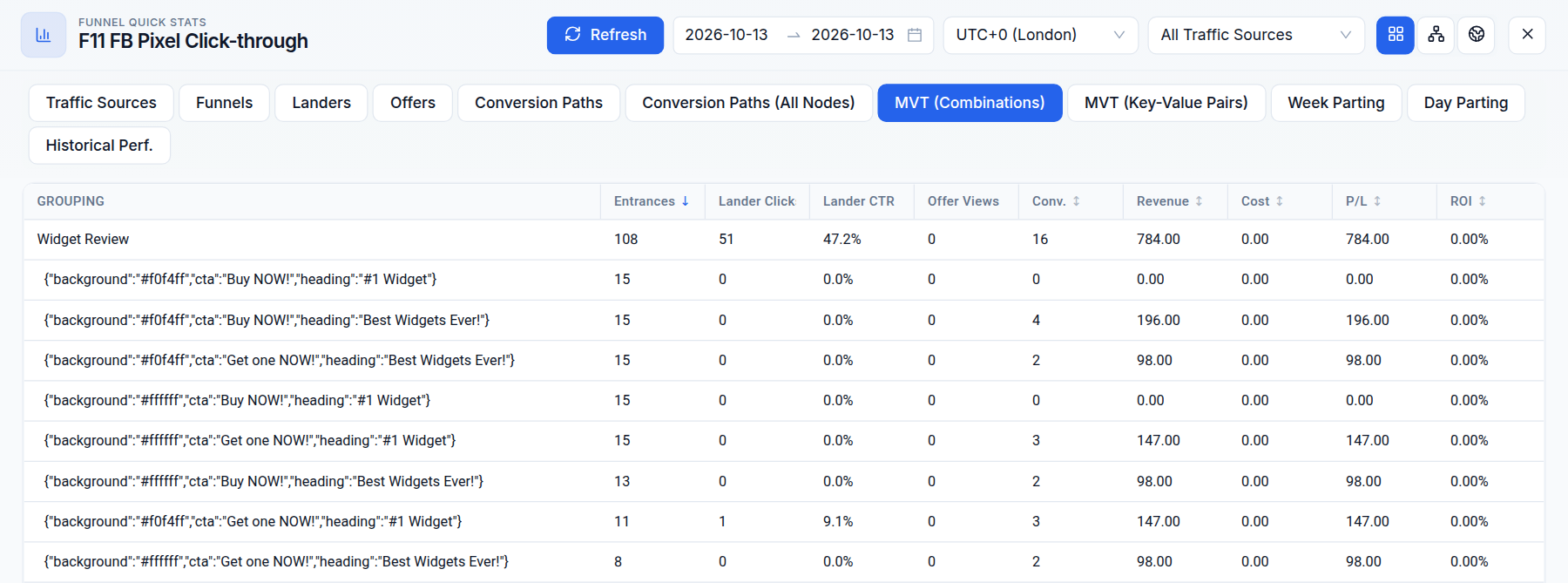
Key-value pairs shows each variation type on its own. That is the grouping to use for an apples-to-apples comparison of one variable. It is not the best grouping to make decisions from, because it does not show how elements interact.
Combination does show that interaction. A row might be:
- Image 1, Heading 2, CTA 1
- Image 2, Heading 1, CTA 3
- and so on
This grouping can produce a large number of rows. The count is the product of the number of variants. With 3 images, 2 headlines, and 4 CTAs, you get 3 x 2 x 4 = 24 combinations. Keep the first tests small.
The useful part of MVT is reading these combinations to find the ones that work best.