

How to use FunnelFlux tokens to pass dynamic data to your landers (and use it)
Landers often print dynamic text: country, city, device make, device model, and similar values.
The usual method is to put that text in the query string (?a=b&c=d), then use JavaScript or PHP to print it in the HTML.
The same method works for values the visitor does not see, such as a FunnelFlux visitor ID passed into a form, or an ID passed into a script.
Passing data to your landers
Section titled “Passing data to your landers”There are two ways to send the values from FunnelFlux.
Edit the lander URL
Section titled “Edit the lander URL”In the lander settings, append the data to the URL. Insert any FunnelFlux token from the URL Tokens field below the URL to make that data dynamic.
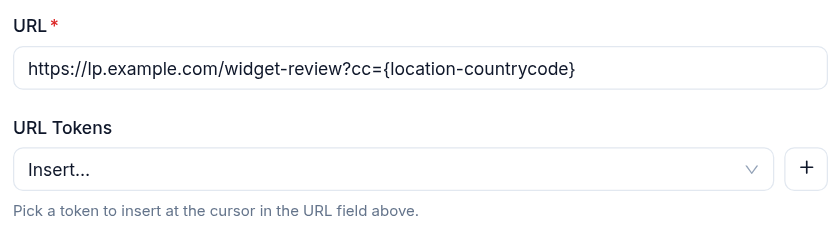
Accumulate URL parameters in the funnel
Section titled “Accumulate URL parameters in the funnel”In the funnel, you can pass accumulated URL parameters to a lander. Right-click the lander node, open Advanced Settings, and turn on Pass accumulated URL parameters:
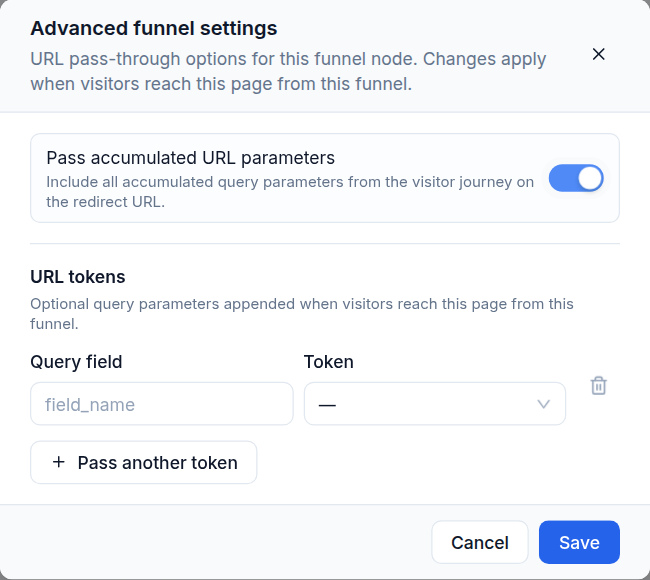
That appends every parameter from the initial tracking link, the one used at the traffic source.
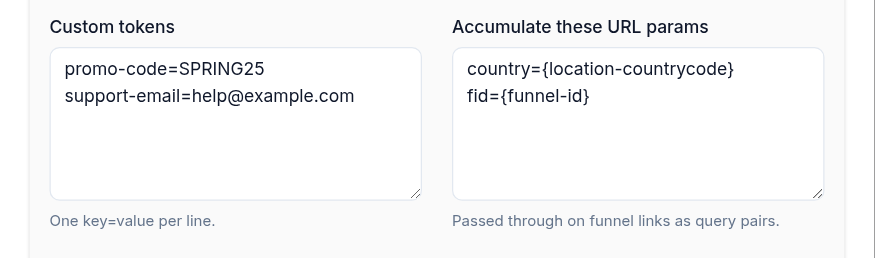
In the funnel settings, under Advanced settings, you can add extra parameters to that list in Accumulate these URL params. Any FunnelFlux token is allowed:
Using JavaScript
Section titled “Using JavaScript”JavaScript runs in the visitor’s browser. It can read the query string and write the values into the page.
Add this function in the <head> to read a value from the query string:
<script>function getURLParameter(name) { return new URLSearchParams(window.location.search).get(name) || '';}</script>If the page already loads the FunnelFlux Universal tracking script, fflux.getURLParam('country') reads the same parameter, so you can use it instead of this function.
See what the on-page JavaScript can read from the URL.
To put the value into the page, give an element an id and set its text:
I love <span id="country"></span>!
<script>document.getElementById('country').textContent = getURLParameter('country');</script>
That inserts whatever you passed as country, such as country=australia or country=brazil.
Use textContent, not innerHTML or document.write.
textContent prints the value as text, so a crafted URL cannot inject HTML or script into your page.
Using PHP
Section titled “Using PHP”PHP runs on the server, before the HTML reaches the visitor. There is less for the browser to get wrong.
Use a .php extension, or configure the web server (Nginx, for example) to pass HTML files through the PHP preprocessor.
Read a query parameter anywhere in the page with:
<?php echo htmlspecialchars($_GET['namehere'] ?? '') ?>namehere is the parameter name.
In ...&fruit=banana..., the name is fruit and the value is banana.
htmlspecialchars stops a crafted URL from injecting HTML into the page.
For organic traffic, where the parameters may be missing, set defaults such as “Your city” or “Your smartphone”. Read the parameters at the top of the page, then fill in any empty ones:
<?php$city = $_GET['city'] ?? '';$country = $_GET['country'] ?? '';$model = $_GET['model'] ?? '';
if ($city === '') { $city = "Your city"; }if ($country === '') { $country = "Your country"; }if ($model === '') { $model = "Your smartphone"; }?>
Print them with:
<?php echo htmlspecialchars($city) ?><?php echo htmlspecialchars($country) ?><?php echo htmlspecialchars($model) ?>Setting a form field from the URL
Section titled “Setting a form field from the URL”To put a value into an HTML attribute, such as a form field’s value, set the attribute from JavaScript.
Example: the FunnelFlux URL is mydomain.com/lander.html?visitor_id={visitor-id}, and a hidden field should receive that visitor ID.
<input type="hidden" name="FF_visitor_id" id="formfield_id1" value="" />
<script>document.getElementById('formfield_id1').value =  new URLSearchParams(window.location.search).get('visitor_id') || '';</script>
The script reads visitor_id from the URL and writes it into the value of the input whose id is formfield_id1.
Put the script after the input, or near </body>, so the input exists when it runs.