

Tracking ClickBank Flows
This guide tracks a ClickBank vendor flow, including PitchPlus upsells, through the ClickBank instant notification (IPN).
The FunnelFlux tracking script adds the visitor’s hit ID to your payment links as vtid.
ClickBank returns that code in the order’s tracking codes, and FunnelFlux uses it to record the sale, rebill or refund against the right visitor.
If you would rather record sales with thank-you page action links, follow Tracking ClickBank sales as a vendor instead.
Set up the ClickBank IPN
Section titled “Set up the ClickBank IPN”Add the FunnelFlux notification URL and secret key in ClickBank using ClickBank instant notification (IPN) setup.
Step 1: Create a funnel in FunnelFlux
Section titled “Step 1: Create a funnel in FunnelFlux”Create a funnel that mirrors your ClickBank flow, including any PitchPlus upsells.
Use landers for pages where no conversion happens, and offers for pages where conversions happen. Any page with ClickBank payment links on it should be an offer.
Link the nodes in the same order as the ClickBank flow and save.
Step 2: Copy the tracking script
Section titled “Step 2: Copy the tracking script”Right-click a page node and choose Send Traffic Here. In the Funnel URL window, turn on Use direct tracking and copy the Universal tracking script. The same script is on System Links under Get campaign link.
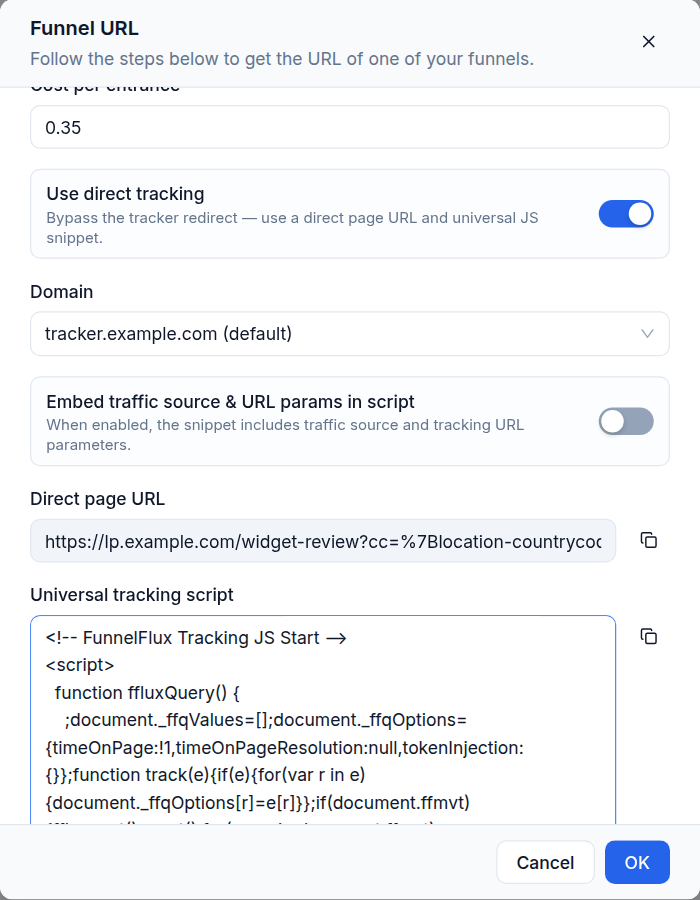
The classic interface at /admin/ also shows a funnel-level script in the funnel’s Advanced Settings.
V2 funnel settings do not have this box.
Paste the script into a text editor, because you need to change it before adding it to your pages.
Step 3: Modify the tracking script
Section titled “Step 3: Modify the tracking script”The script ends with an fflux.track call like this:
fflux.track({ timeOnPage: false, timeOnPageResolution: 3000, noCookies: false, tokenInjection: { intoUrl: false, intoForms: { selector: null }, intoLinks: { selector: null }, tokens: {} }});Change it so that the script adds the hit ID to your payment links:
fflux.track({ timeOnPage: false, timeOnPageResolution: 3000, noCookies: false, tokenInjection: { intoUrl: false, intoForms: { selector: null }, intoLinks: { selector: 'a.flux_payment' }, tokens: { vtid: '{hit-id}', cbf: '[[cbf]]' } }});The script finds every link with the class flux_payment and appends vtid with the current hit ID.
It also appends cbf, taken from the page URL.
{hit-id} is the FunnelFlux hit ID token.
A token written as [[name]] is replaced with the value of the name parameter in the page URL.
ClickBank uses cbf to keep the PitchPlus session for buyers without cookies.
See ClickBank’s Upsell Flows article.
Add the modified script to every page in the flow.
Step 4: Mark your payment links
Section titled “Step 4: Mark your payment links”Add the flux_payment class to every ClickBank payment link, including the upsell accept and decline links.
Change each payment link from:
<a href="https://ITEM.VENDOR.pay.clickbank.net/">Buy now</a>to:
<a class="flux_payment" href="https://ITEM.VENDOR.pay.clickbank.net/">Buy now</a>Your page code can be more complex.
The only requirement is that each payment <a> element has this class.
When a buyer clicks, the link carries vtid with their hit ID.
When the order completes, the IPN sends that code back and FunnelFlux records the conversion.
Step 5: Send traffic
Section titled “Step 5: Send traffic”You can send visitors through a FunnelFlux tracking link, or link straight to your first page, because the pages run the tracking script.
When you link straight to a page, add flux_fts to the URL to declare the traffic source, along with that source’s custom tracking fields.
Right-click the lander or traffic entrance node and choose Send Traffic Here. In the Funnel URL window, copy the link and move its whole query string onto your page URL.
For example, if the link for Facebook is:
https://trackerdomain.com/?flux_fts=qpopxcaoqcpzxiizxieqoqicoaapxlclztlcta0083&place=#{{placement}}&ad_id=#{{ad.id}}&adset_id=#{{adset.id}}&campaign_id=#{{campaign.id}}&source=#{{site_source_name}}change the base URL to your page:
https://your.clickbank-url.com/path-to-funnel/?flux_fts=qpopxcaoqcpzxiizxieqoqicoaapxlclztlcta0083&place=#{{placement}}&ad_id=#{{ad.id}}&adset_id=#{{adset.id}}&campaign_id=#{{campaign.id}}&source=#{{site_source_name}}If your results look wrong, use the chat in your FunnelFlux dashboard or email support@funnelflux.com.