

Configuring an offer source
Offer sources are where your offers come from, usually affiliate networks.
When you add an offer source, you enter the network’s own tokens, and FunnelFlux builds the postback URL the network uses to report conversions back to FunnelFlux.
Open Sources > Offer Sources and click Add Offer Source. If your network is listed under Use template, pick it to fill in the fields.
Example: your network lets you pass data in the parameters s1 to s5. Use the last available one for FunnelFlux’s hit ID. If the network has a dedicated field for unique click IDs, use that instead.
Example configuration
Section titled “Example configuration”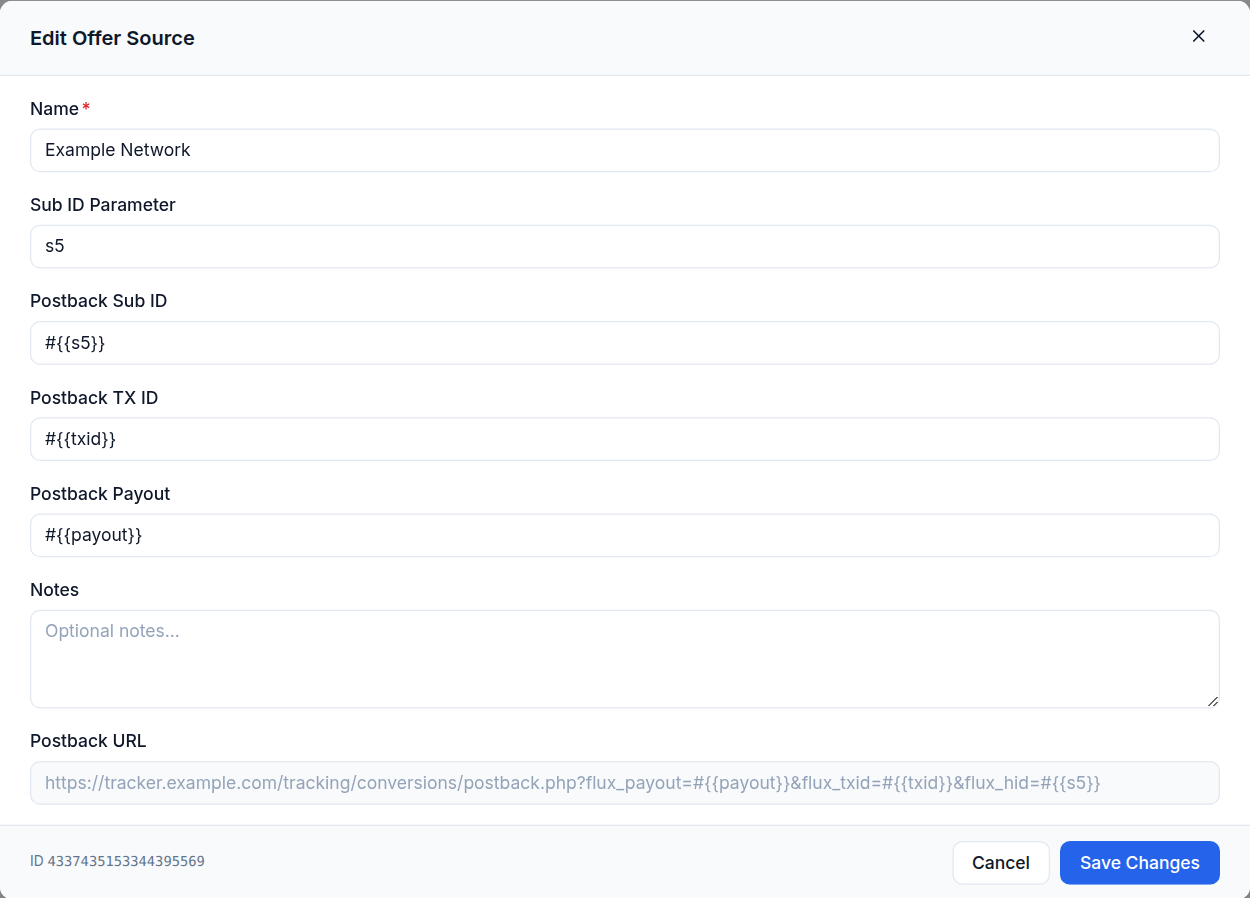
- Sub ID Parameter:
s5, the parameter you send FunnelFlux’s unique hit ID in. FunnelFlux needs the hit ID to track conversions. - Postback Sub ID: the network’s token for that parameter, here
#{{s5}}. - Postback Payout: the network’s token for the payout.
- Postback TX ID: optional. The network’s transaction ID token, used to tell apart several conversions by the same visitor, for example a sale followed by an upsell.
Postback URL then shows the finished URL to paste into your network.
These fields only build the postback URL for you. They do not change your campaigns, funnels or any other tracking.
When you create offers for this offer source, add &s5={hit-id} to the offer URL so FunnelFlux’s hit ID reaches the network.
For network-specific examples, see Setting up conversion tracking between an affiliate network and FunnelFlux.