

Use multiple domains using CNAMEs
A FunnelFlux license key is bound to a single primary tracker domain. To use multiple domains, add CNAME records that alias the primary domain.
What is a CNAME record?
Section titled “What is a CNAME record?”CNAME stands for Canonical Name. A CNAME record aliases one name to another.
For example, if you keep all your documents on a server you normally access at docs.example.com, you may also want to access it at documents.example.com.
To do this, add a CNAME record that points documents.example.com to docs.example.com.
Visitors to documents.example.com then see exactly the same content as docs.example.com.
How to create a CNAME record
Section titled “How to create a CNAME record”Your DNS provider’s documentation explains how to create a CNAME record with that provider.
In general, you add a record for:
some.domain.comwith a target of:
some.otherdomain.comand set the record type to CNAME. It points domain or subdomain A to domain or subdomain B.
How to set up a CNAME alias domain with FunnelFlux
Section titled “How to set up a CNAME alias domain with FunnelFlux”If you used our installation scripts, you don’t need to change anything on your server. Nginx serves any domain pointed at the server.
If you set up your own server, make sure your web server serves the alias domain from the same virtual host as your tracker domain. This depends on your own server setup, so we can’t do it for you.
If you use Cloudflare, put the alias domain in the same Cloudflare account and set it up as described in Using Cloudflare DNS for your tracker.
FunnelFlux generates links with your Default Tracking Domain. To see or change it, click the Settings (gear) icon in the top bar, click System Settings, and scroll to the domains section. Add your alias domain under Domain Inventory, then pick it as the Default Tracking Domain if you want all generated links to use it. This does not change the domain you sign in on.
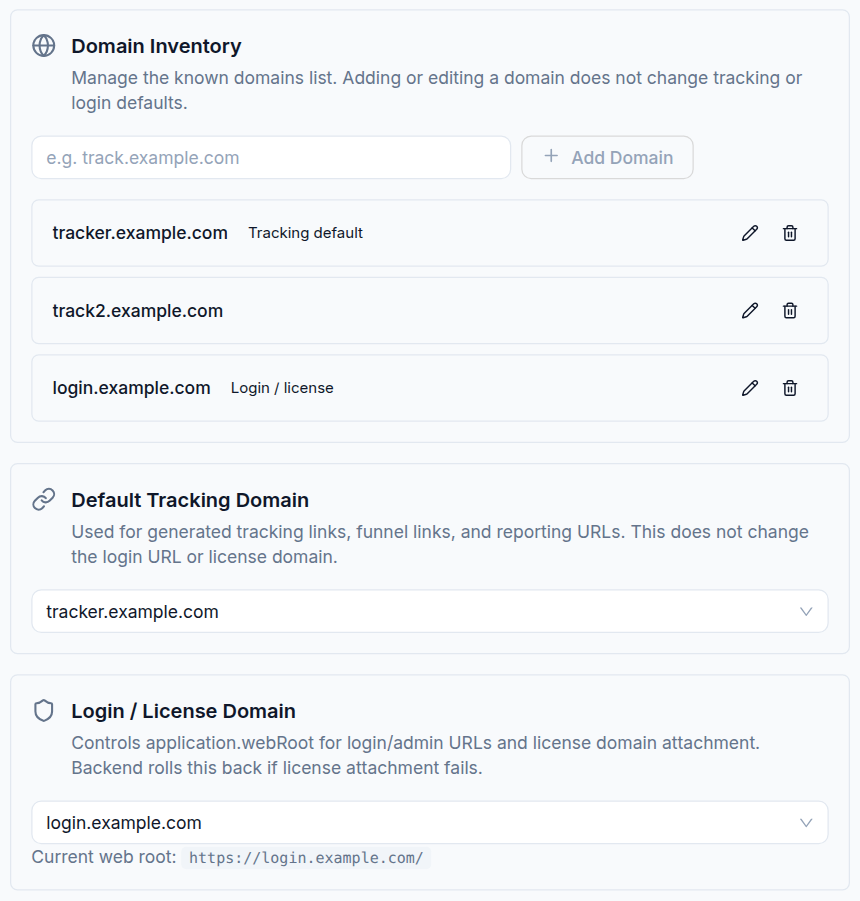
To use an alias for only some links, replace the domain in those tracking links by hand.
If you use an alias domain for a tracking link, you must use the same alias for the Action Links on your landing page. You need to do this manually, since you control the landers and the links on them.
Use the same domain for a user’s whole journey. FunnelFlux uses cookies, and the Action Link can’t read them on a different domain. For example:
Primary tracker domain
Entrance URL:
https://funneldomain.com/?flux_fts=tliapzqtoloiztzozelqlcaicapqppiqplob8d4fAction Link URL:
https://funneldomain.com/?flux_action=1&flux_f=15496021858401080&flux_ffn=15496364045352782CNAME domain
Entrance URL:
https://ffotherdomain.com/?flux_fts=tliapzqtoloiztzozelqlcaicapqppiqplob8d4fAction Link URL:
https://ffotherdomain.com/?flux_action=1&flux_f=15496021858401080&flux_ffn=15496364045352782Building Action Links dynamically
Section titled “Building Action Links dynamically”The {flux-domain} token passes the name of the tracking domain (or the alias domain, if used) to your landers.
With it, you can build your Action Link dynamically in PHP or JavaScript.
You need to implement this yourself, since the method depends on your setup.
We have a separate guide: Dynamic landing page tracking links using CNAMEs effectively.
In general, you read the value from the URL and inject it into the page HTML.
The examples below assume you pass the token to your lander URLs with ...&ffdomain={flux-domain}.
Add this code to the top of your lander.
Your lander must be a .php file, or your server must be configured to process PHP in HTML files.
<?php$ffdomain = $_GET['ffdomain']; //key you have {flux-domain} passed under?>Then inject the domain into the page HTML:
<a href="<?php echo "http://".$ffdomain."/?flux_action=1"?>">You can do this in one line of code within the <a> element, but the longer form above is easier to follow.
JavaScript
Section titled “JavaScript”As with PHP, use JavaScript to read the URL parameter, then inject it into the links in the HTML.
Place this code in your page, ideally in <head> or at the start of <body>:
<script>function getURLParameter(name) { return decodeURI( (RegExp(name + '=' + '(.+?)(&|$)').exec(location.search)||[,null])[1] || '' );}</script>You can now inject any query string parameter into your page HTML by referencing its key.
If you passed ...&ffdomain={flux-domain}, the key is ffdomain, and you can output an <a> element with your Action Link using:
<script>document.write('<a href="http://' + getURLParameter('ffdomain') + '/?flux_action=1">Call To Action Text</a>')</script>A better but more complex approach is to manipulate the DOM rather than use document.write.
Limits of alias domains
Section titled “Limits of alias domains”A CNAME domain only masks your tracker domain in redirect and tracking URLs. It is not a fully functional licensed domain.
Pros
- Aliases the primary tracker domain
- Can alias your tracking links (Entrance and Action Link URLs must use the same domain)
Cons
- You can’t sign in on an alias domain.
Sign in at
/admin/login.phpon your original, licensed domain. After login you land in the classic interface at/admin/; open/v2-ui/for the V2 Dashboard.