

Advanced data passing to your landers using PHP nodes
You can create values in a PHP node and read them on later landers.
Use this when the node calls an external API and the lander needs the response, or when you want a PHP function’s result on the page.
Add a PHP node and place it in the funnel before the landers that need the values:
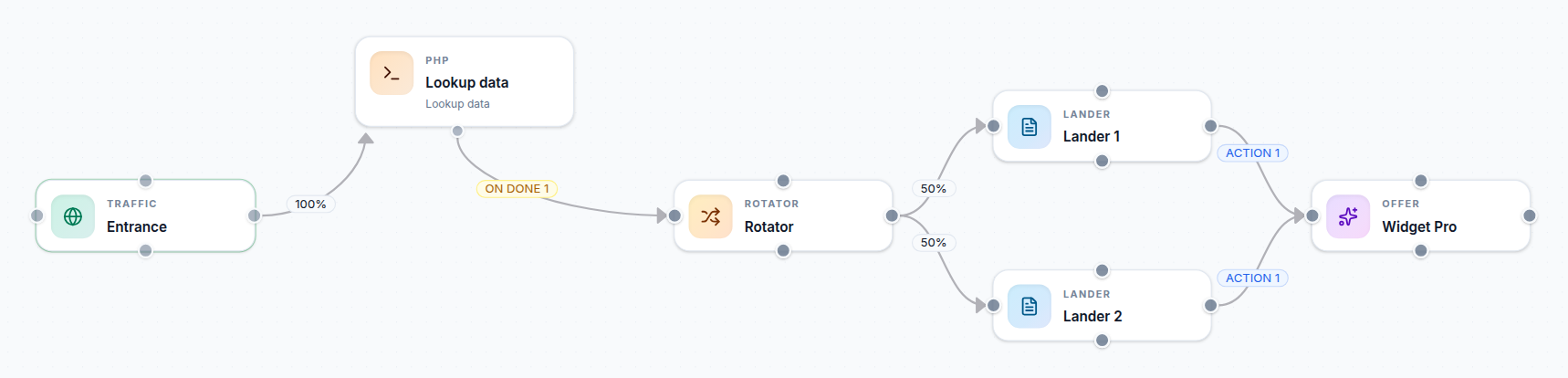
Step 1: Add the values in the PHP node
Section titled “Step 1: Add the values in the PHP node”Double-click the PHP node and enter this code:
<?phprequire_once 'PHPNodeHelpers.php';
// Put whatever you need here:$accuParams['curTime'] = date("Y-m-d H:i:s");$accuParams['rand'] = rand();$accuParams['unix-timestamp'] = time();
// Save your new key/value pairs in the accumulation bufferforeach($accuParams as $key => $val){    PHPNodeHelpers::accumulateParam($key, $val);}
?>
PHPNodeHelpers::accumulateParam adds each pair to the Accumulated URL Params buffer and keeps what is already there.
Step 2: Pass the buffer to the lander
Section titled “Step 2: Pass the buffer to the lander”Right-click the lander node, choose Advanced Settings and turn on Pass accumulated URL parameters.
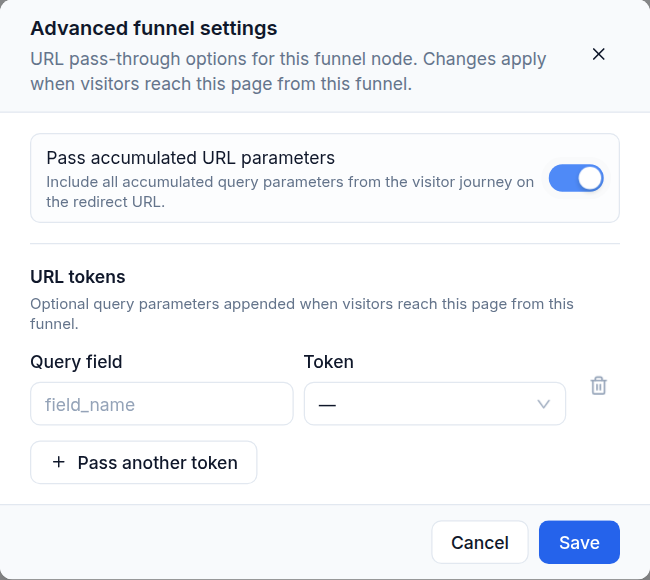
The lander then receives the whole Accumulated URL Params buffer in its URL.
That buffer holds data passed on the initial tracking URL, anything set in the advanced funnel settings, and data added by PHP nodes like the one above.
You do not set an outgoing URL on the PHP node for this. The node already redirects to the lander. You are only adding URL parameters to that redirect.
The parameter names are the keys in $accuParams.
The sample above adds parameters like these to the lander URL, shown here before URL encoding:
...&curTime=2026-01-15 17:07:32&rand=5647849234&unix-timestamp=1768496852...Important notes
Section titled “Important notes”You can call any PHP function in these nodes. The node runs PHP on your server, with FunnelFlux token processing and helper functions added.
You can also call an external API from the node. See calling an external API from a PHP node.
The PHP must finish before FunnelFlux redirects to the next node. If the node calls an external API, that call adds to the time the visitor waits before the redirect. Set a short timeout on external calls.
Using FunnelFlux tokens
Section titled “Using FunnelFlux tokens”You can read data for the current visitor with any FunnelFlux token:
<?php
$user_device = '{device-type}';$country = '{location-countryname}';
?>
FunnelFlux replaces tokens in the PHP before the code runs. The token names are the same as the lander and offer URL tokens.
For tracking fields, read the values with the helper instead of a {trackingfield-...} token.
Tracking field values come from the visitor’s URL, and a value containing a quote would break the code if pasted into it as a token:
<?phprequire_once 'PHPNodeHelpers.php';
$trackingFields = PHPNodeHelpers::loadTrackingFields();$fieldValue = $trackingFields['fieldname'] ?? '';
?>
Replace fieldname with the name of the tracking field on your traffic source.
See PHP node helper functions for all helpers.