

Syncing conversion data with email systems
A common path looks like this:
Traffic, then FunnelFlux, then a landing page, then an opt-in (usually email), then a post-submit redirect to an affiliate network or another offer you do not control.
You will often want the conversion in FunnelFlux and a tag on the contact in the email system.
FunnelFlux alone does not update the email platform. That update needs the platform’s API, or its own goal tracking, usually JavaScript.
Two ways to do this
Section titled “Two ways to do this”- Place the email system’s goal tracking on the affiliate network or offer conversion page as well. That works when the tracking exists, you can place it, and the offer allows client-side tracking.
- Use one postback URL to fire the conversion to FunnelFlux and tag the contact in the email system.
Both are covered below.
Approach 1: Use the email system’s conversion tracking
Section titled “Approach 1: Use the email system’s conversion tracking”Some email systems track conversions with their own JavaScript.
That only connects the conversion to a contact if the system already knows who the visitor is.
When the email system can identify the contact
Section titled “When the email system can identify the contact”- The visitor submitted an opt-in form from that provider, so the JavaScript can match them to that contact from cookies.
- They clicked a link in an email that landed on a page with the JavaScript, and the email referral tells the script which contact arrived.
- You can put the email address in the JavaScript yourself, for example by passing it in the URL and reading it on the page.
Each case assumes you already tracked the visitor. This method is a poor fit when you redirect straight after a custom opt-in to a page you do not control.
Example: ActiveCampaign
Section titled “Example: ActiveCampaign”ActiveCampaign has site tracking and event tracking. Site tracking is JavaScript on your site that records page views when ActiveCampaign already knows the visitor: they are a contact, and they have clicked an email link, submitted a form, or taken a similar action.
When that is true, page views are logged. You can add the tracking JavaScript to the offer conversion page, then use a URL filter in an ActiveCampaign automation to run an action.
Add this tracking JavaScript:
<script>var trackcmp_email = '';var trackcmp = document.createElement("script");trackcmp.async = true;trackcmp.type = 'text/javascript';trackcmp.src = '//trackcmp.net/visit?actid=25269080&e='+encodeURIComponent(trackcmp_email)+'&r='+encodeURIComponent(document.referrer)+'&u='+encodeURIComponent(window.location.href);var trackcmp_s = document.getElementsByTagName("script");if (trackcmp_s.length) { trackcmp_s[0].parentNode.appendChild(trackcmp);} else { var trackcmp_h = document.getElementsByTagName("head"); trackcmp_h.length && trackcmp_h[0].appendChild(trackcmp);}</script>If you pass the visitor’s email to the affiliate network in the URL, you can inject it here as well.
This example assumes the email arrived in an s5 parameter:
<script>var trackcmp_email = '##s5##';var trackcmp = document.createElement("script");trackcmp.async = true;trackcmp.type = 'text/javascript';trackcmp.src = '//trackcmp.net/visit?actid=25269080&e='+encodeURIComponent(trackcmp_email)+'&r='+encodeURIComponent(document.referrer)+'&u='+encodeURIComponent(window.location.href);var trackcmp_s = document.getElementsByTagName("script");if (trackcmp_s.length) { trackcmp_s[0].parentNode.appendChild(trackcmp);} else { var trackcmp_h = document.getElementsByTagName("head"); trackcmp_h.length && trackcmp_h[0].appendChild(trackcmp);}</script>With that tracking in place, do two things in ActiveCampaign:
- Whitelist the offer conversion domain so tracking is allowed.
- Create an automation that starts from the offer conversion page URL.
The whitelist is in Settings, on the tracking page where you copy the JavaScript.
For the automation, add a “Visits a Webpage” start action:
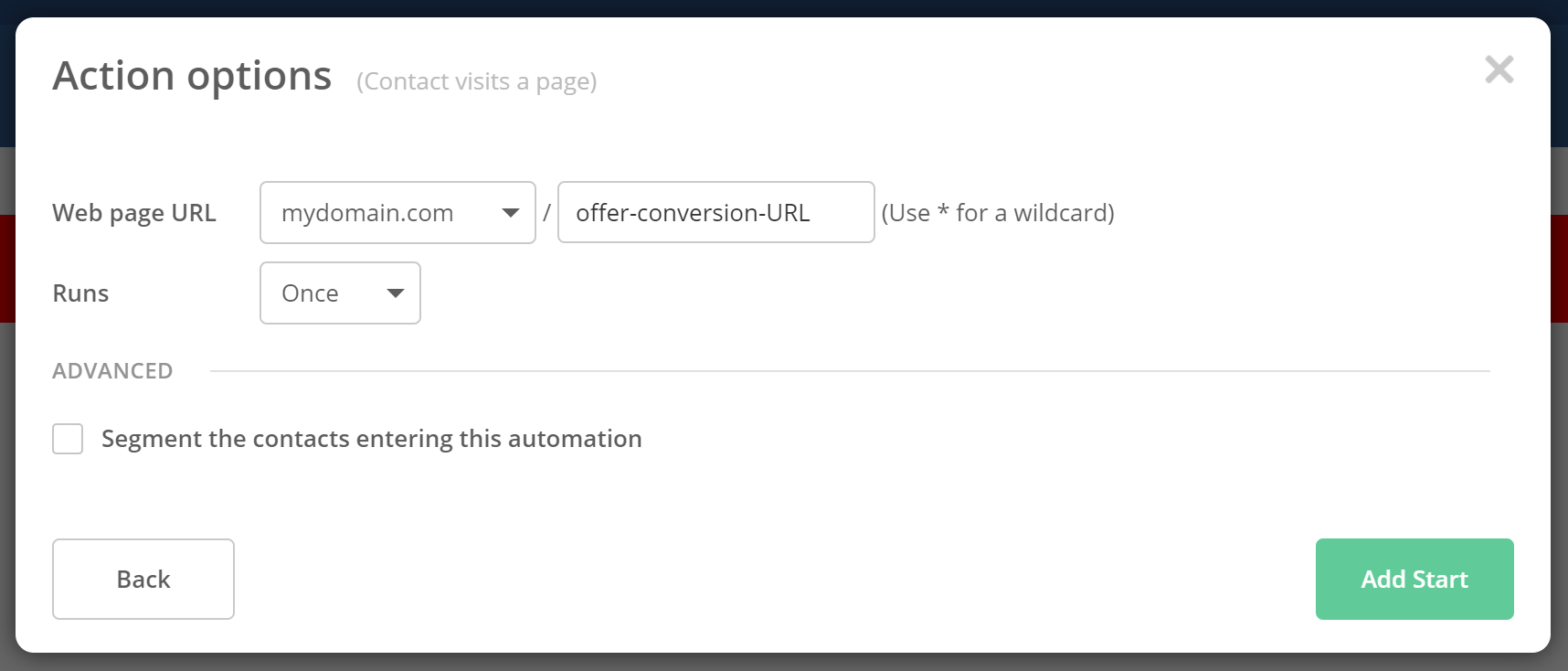
After that start, add the actions you want, such as a tag or a custom field set to converted = YES:
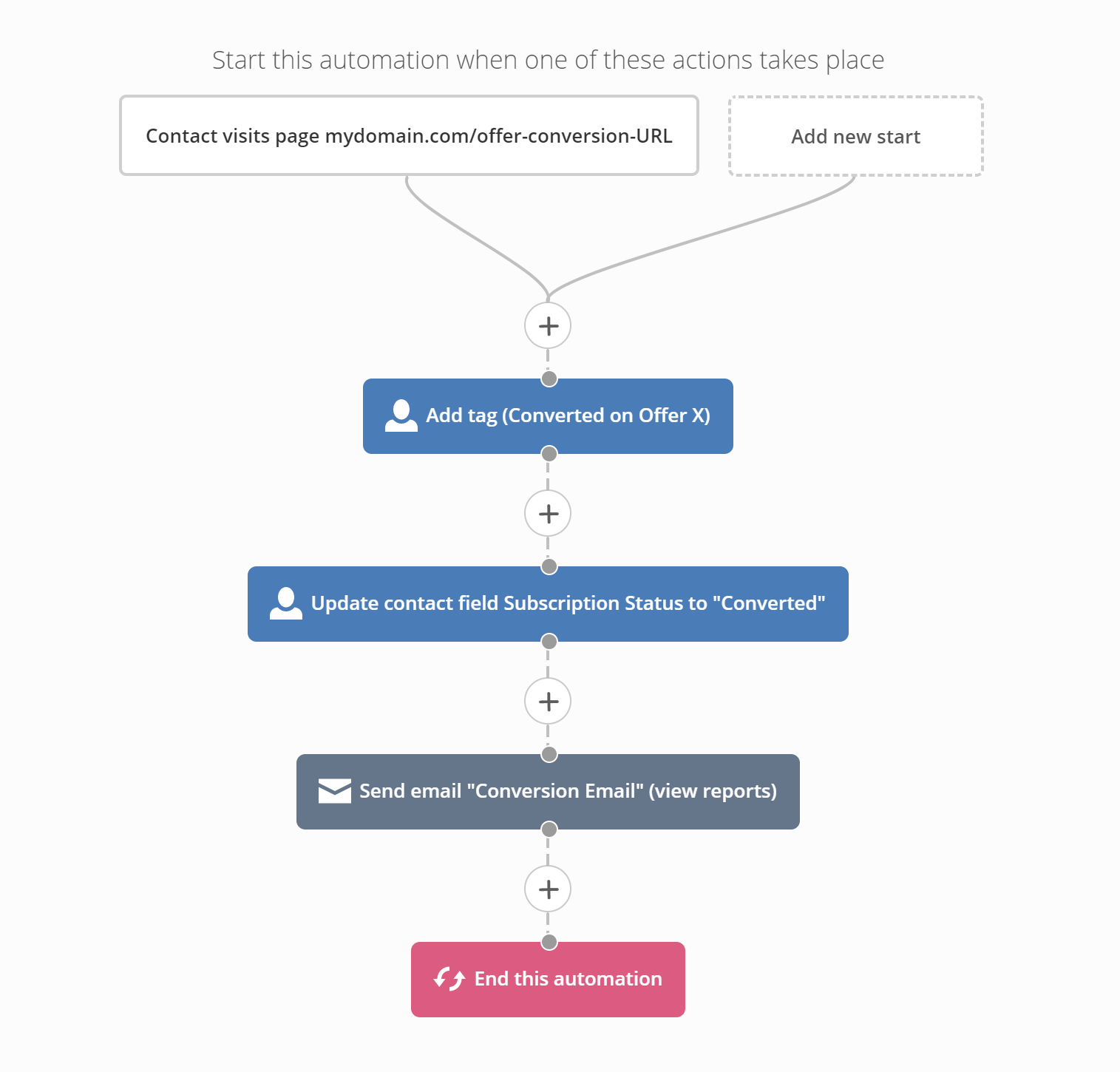
This method fits when you own the domains where conversions are tracked, for example a Shopify store.
Approach 2: Postback URL handling
Section titled “Approach 2: Postback URL handling”The more reliable option depends less on the email system’s browser tracking. It needs more specific development: server-to-server conversion tracking, then a pass of that data to more than one system.
Pass the visitor ID, using the token {visitor-id}, from FunnelFlux to the landing page, the email system, and the network.
Log that visitor ID with the opt-in form as a hidden field, and pass it to the affiliate network. You can then cross-reference those IDs and update the email system when the network records a conversion.
The flow:
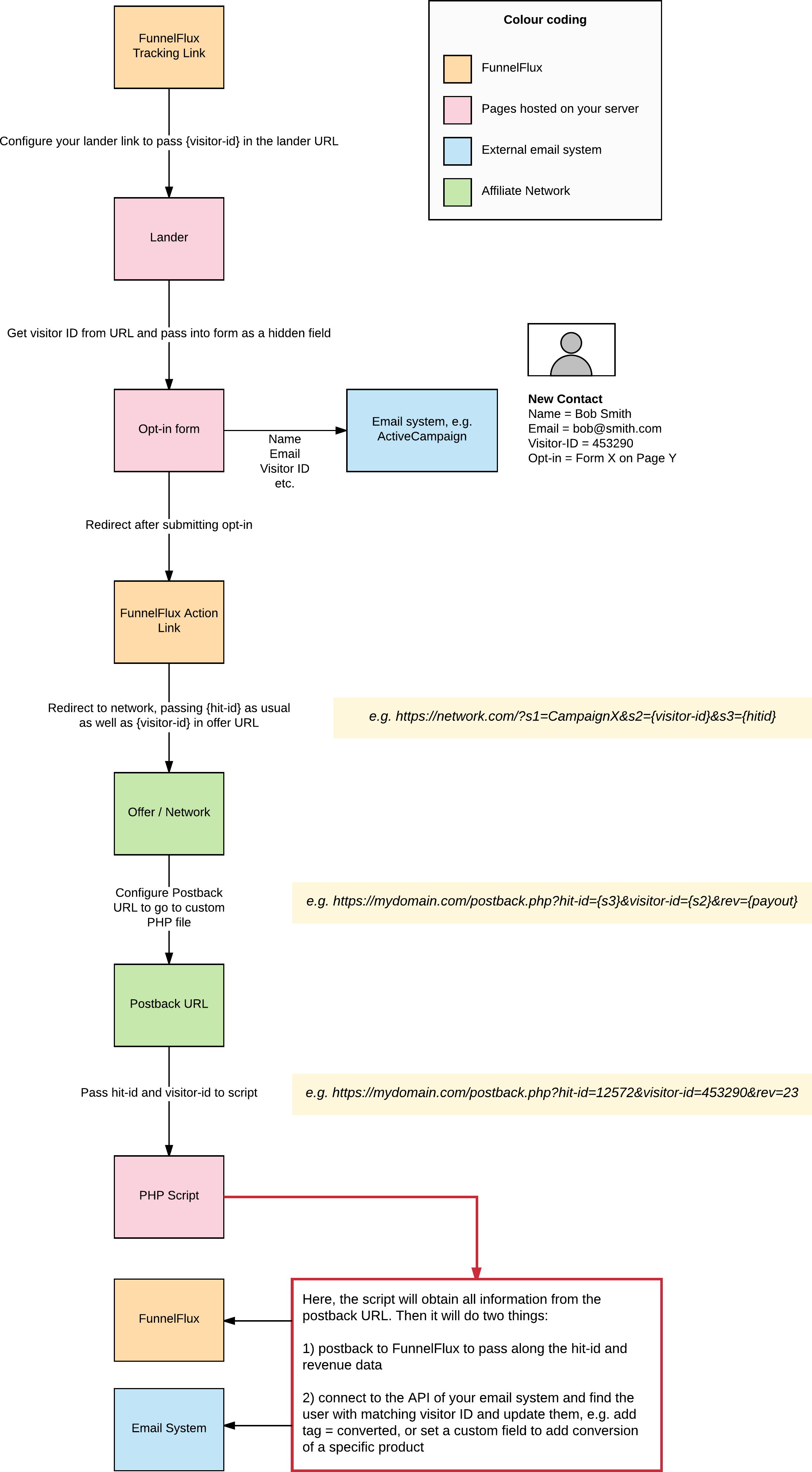
You need a PHP script, or something similar, that receives the network postback, forwards it to FunnelFlux for postback tracking, then calls the email system API.
The API call looks up contacts that have that visitor ID in a custom field. You set that field when the visitor submitted the form.
Not every email system can do this lookup. It depends on the API, and on how the developer implements it.
You can also store the opt-in in a local database. When the postback arrives, look up the visitor ID, read the email address, and use that email as the identifier in the email system’s API.
That needs storage on your side, for example a local MySQL database. A developer can build it in whatever language they use.
Use the visitor ID for this cross-reference.
You do not control the hit ID FunnelFlux sends to the network for conversion tracking.
Hit IDs are per node.
The offer node’s hit ID does not exist before the opt-in and redirect, so you cannot log it at opt-in time.
The visitor ID stays the same across the opt-in and redirect, so use that as the cross-reference.
FunnelFlux keeps it in the visitor’s tracking session, which a daily cleanup deletes once it has gone 72 hours without a visit (the default SESSION_FILE_TTL_HOURS in includes/appConfig.php).