

PHP node helper functions
A PHP node runs your PHP code on your FunnelFlux server when a visitor reaches it, then sends the visitor down one of its outgoing connections.
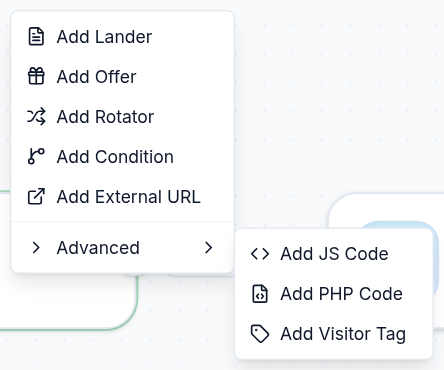
To add one, right-click the funnel canvas, open Advanced and choose Add PHP Code. Double-click the node to open the code editor.
How the code runs
Section titled “How the code runs”Before your code runs, FunnelFlux does three things:
- It removes the
<?phpand?>tags, so you can keep them in the editor or leave them out. - It copies every Accumulated URL Param into
$_GET, so$_GET['name']reads a value from the buffer. - It replaces
{tokens}such as{location-countrycode}with the visitor’s values, and[[custom-tokens]]with the values set in the funnel’s custom tokens.
Token replacement is plain text replacement in your source code.
A value that contains a quote character can break the code.
For values the visitor controls, such as tracking fields, the user agent or the referrer, read them with PHPNodeHelpers::loadTrackingFields() or from $_SERVER instead of pasting a token into a string.
Choosing the route
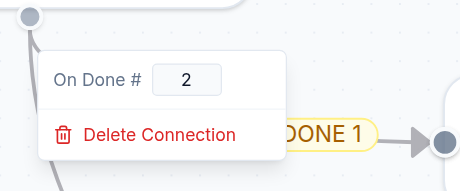
Section titled “Choosing the route”Each outgoing connection of a PHP node has an On Done number from 1 to 64. To set it, right-click the connection and change On Done #. Each connection from the same node needs its own number.
Your code picks the route with return:
<?php
return 2; // follow the On Done 2 connection
?>
If the code returns nothing, returns a number that has no connection, or throws an exception, the visitor follows the connection with the lowest On Done number. PHP warnings and notices count as exceptions here, so they also send the visitor down that connection.
A fatal error is different. A syntax error, a call to a function that does not exist, or a type error stops the request. FunnelFlux writes “Uncaught exception” and the error to its error log, and the visitor is not redirected. Test your code before you send traffic through the node.
Helper functions
Section titled “Helper functions”Load the helpers at the start of the code:
require_once 'PHPNodeHelpers.php';The functions are:
| Function | What it does |
|---|---|
PHPNodeHelpers::accumulateParam($key, $value) |
Adds one key/value pair to the Accumulated URL Params buffer. |
PHPNodeHelpers::loadAccumulatedParams() |
Returns the Accumulated URL Params buffer as an array. |
PHPNodeHelpers::saveAccumulatedParams($params) |
Replaces the whole buffer with the array you pass. An empty array is ignored. |
PHPNodeHelpers::loadTrackingFields() |
Returns the visitor’s tracking fields as an array. Fields defined on the traffic source but not received are included with a null value. |
PHPNodeHelpers::updateTrackingFields($fields) |
Sets tracking fields for the visitor to the values you pass. The fields must already exist on the traffic source. |
PHPNodeHelpers::sendMail($config) |
Sends an email through the SMTP server you set. |
To add values without losing what is already in the buffer, use accumulateParam.
saveAccumulatedParams overwrites the buffer.
Pass every field to updateTrackingFields in one call.
FunnelFlux records which fields an update changed, and a second call replaces that record with only its own fields.
sendMail takes this array:
PHPNodeHelpers::sendMail( ['to' => 'you@you.com','email-subject' => 'Open this now','email-body' => 'The html email content','smtp-configuration' => [ 'server' => 'your-smtp.server.com', 'port' => 'port number', 'secure' => 'ssl', 'username' => 'username to smtp service', 'password' => 'password to smtp service', 'from-name' => 'Me', 'from-email' => 'me@me.com',]] );secure can be '', 'ssl' or 'tls'.
The visitor waits while the email is sent, up to the 15-second SMTP timeout.
The visitor waits while your code runs. Keep external calls short and set a timeout on them.
Related pages: