

What is the FunnelFlux Buffer and how to use it
The FunnelFlux buffer is temporary memory for data passed into your URLs. That includes both entrance links and action links.
Buffer data is not stored in your database. Use it to pass dynamic information between pages.
How to get data into the buffer
Section titled “How to get data into the buffer”Any data you pass in your URLs enters the buffer. You can then read it through tokens in FunnelFlux.
Start with this action link:
https://tracking-domain.com/?flux_action=1Append a parameter, page=products:
https://tracking-domain.com/?flux_action=1&page=productsThat parameter is added to the buffer and is available during URL redirects.
The buffer field name is page.
The buffer value is products.
How to get data out of the buffer
Section titled “How to get data out of the buffer”Use the buffer token to inject buffer values into lander URLs, offer URLs, JavaScript nodes, and PHP nodes.
{buffer-fieldname}If you appended page=products, the buffer token is:
{buffer-page}In JavaScript and PHP nodes, FunnelFlux replaces the token with the plain value before the code runs.
Put it inside quotes, for example var page = '{buffer-page}';.
If the buffer has no field with that name, the token becomes an empty string.
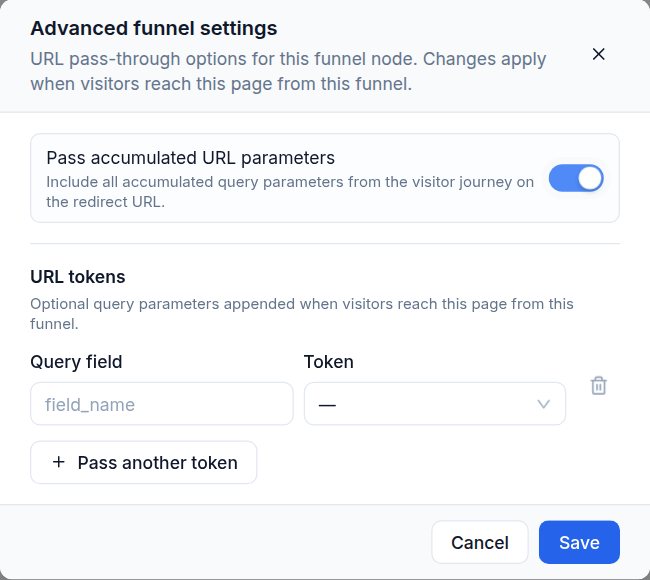
To pass all accumulated parameters to a page instead, right-click the lander or offer node in the funnel editor and click Advanced Settings. Turn on Pass accumulated URL parameters. FunnelFlux then adds the accumulated URL parameters to that page’s URL, including traffic source data and temporary data.
Use buffer tokens to make a lander dynamic
Section titled “Use buffer tokens to make a lander dynamic”Say you have one lander that supports several languages, and you want the greeting to follow the visitor’s country.
In the lander, print a greeting from the country code:
<?php
$country = !empty($_GET['cc']) ? $_GET['cc'] : 'US';
if ($country == 'ES') {    echo 'Buen día!';}
elseif ($country == 'IT') {    echo 'Buona giornata!';}
elseif ($country == 'SI') {    echo 'Dober dan!';}
elseif ($country == 'DE') {    echo 'Schönen Tag!';}
else {    echo 'Good day!';}
?>
You can use the FunnelFlux country code for this.
This example uses the buffer token {buffer-country} instead.
In the FunnelFlux lander URL, add the buffer token so the page can pick a language:
https://lander-domain.com/lander/index.php?cc={buffer-country}On the action link or entrance link, before the redirect to the lander, pass the value that should enter the buffer:
https://tracking-domain.com/?flux_action=1&country=DEThat URL creates a buffer field named country with the value DE.
You can inject that value into lander URLs, offer URLs, JavaScript nodes, and PHP nodes.
The lander URL renders from that buffer value:
https://lander-domain.com/lander/index.php?cc=DEThe lander filters the passed country parameter and prints the greeting defined in the PHP above.
Schönen Tag!The buffer is temporary. Buffer data is not available in Drilldown reports or stats. If you need this data stored, use a traffic source tracking field.