

How entrances, node views, clicks and uniqueness works
Visitors move from node to node. Nothing in the funnel forces a single path.
Other trackers usually work like this:
- The visitor loads a campaign link and has one entry point.
- The visitor loads a lander, unless you are direct-linking.
- The visitor can click through to an offer.
That flow can be described with visits, clicks, and conversions.
In FunnelFlux a visitor can enter at any node, because you can generate a link for any node. They can move to and from any node in the design, including lander to lander and offer to offer. They are not forced from lander to offer and then finished.
The stats that describe that are lander views, lander clicks, offer views, offer clicks, node views, and a unique count for each.
How entrances work
Section titled “How entrances work”An entrance is a visitor entering the funnel. That is either a tracking link that redirects them, or a page load that runs the FunnelFlux Universal tracking script (direct tracking).
Moving between nodes with action links does not create a new entrance.
A new entrance is created, and it is non-unique, when the visitor does any of these:
- Loads another FunnelFlux tracking link. That includes using an entrance link on the page instead of an action link.
- Clicks an ordinary link to a new page that has the Universal tracking script on it.
- Refreshes a page that has the Universal tracking script on it.
- Reloads a page with the Universal tracking script on it later.
- Clicks another ad later that leads to the same funnel.
It is a new entrance because they reached a node indirectly. They did not use the action link that connects the nodes, and the previous node was not the referring page.
It is non-unique because FunnelFlux already knows the visitor and has tracked or cookied them. They keep the same visitor ID.
Entrances are usually much higher than unique entrances. People return to pages on their own, or click ads more than once into the same funnel.
The Universal tracking script is not meant to be the only way to move between nodes. Used on its own, without action links, a move between two pages that both have it creates a new entrance.
How node views work
Section titled “How node views work”A node view is a hit on a node.
A node is anything in the funnel: the default traffic node, a rotator, a condition, a lander, or an offer.
Lander views and offer views are node views where the node type is lander or offer.
How many node views you see depends on how many nodes the visitor passes through.
In this funnel the visitor is redirected to a lander:
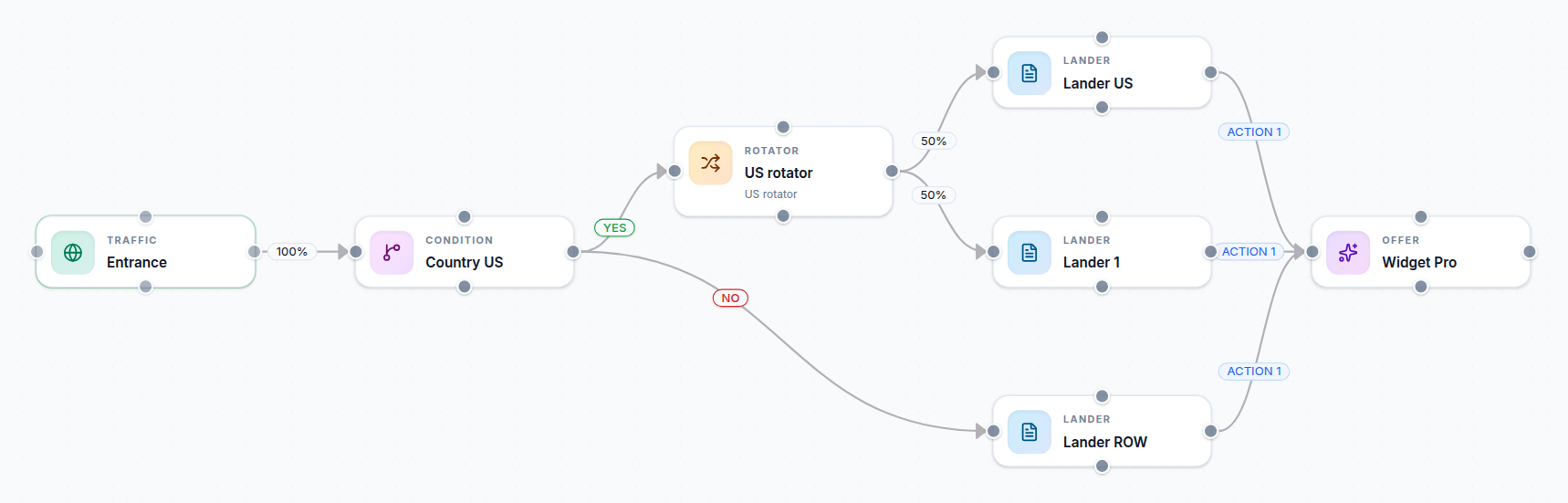
They enter at the traffic node, pass a condition that sends them to a rotator, and then reach a lander.
That is 4 node hits. All of them are unique. One of them is a unique lander view.
How a drilldown counts one visit
Section titled “How a drilldown counts one visit”Nodes are the elements you place in the funnel diagram.
Consider this funnel:

It has 3 nodes:
- The traffic node
- A lander node
- An offer node
If one visitor traverses the whole funnel and reaches the offer, the stats show:
- 1 entrance
- 3 node views
In a drilldown that does not group by any node (lander, offer, node ID, node name, and so on), those nodes are aggregated into one row. That row’s node views are higher than its entrances.
The groupings you select also change the CTR FunnelFlux shows.
Here is a second funnel, with 6 nodes and one visitor traversing all of them:

Traffic > Lander 1 > Lander 2 > Lander 3 > Lander 4 > OfferA drilldown with no node grouping shows:
- Entrances: 1
- Node views: 6
- Clicks: 4
- CTR: 4/6 = 67%
Without a node grouping, that CTR is the average CTR of every node in the row.
When you want CTR per lander, add the Lander grouping to the drilldown.
The funnel above then shows 4 rows instead of 1:
- Lander 1: 1 node view, 1 click, CTR 100%
- Lander 2: 1 node view, 1 click, CTR 100%
- Lander 3: 1 node view, 1 click, CTR 100%
- Lander 4: 1 node view, 1 click, CTR 100%
Pick a grouping that matches the funnel. A lander-to-lander flow is possible in FunnelFlux, and it is not typical in other trackers.
How unique node views work
Section titled “How unique node views work”Node views are recorded inside a particular entrance.
A returning visitor who creates a new, non-unique entrance, and travels through the same nodes again, still generates unique node views. Those views belong to the new entrance, not to the earlier one.
Each entrance is a separate visit. Leaving and coming back, even after two hours, is another entrance. Nodes viewed during that entrance are unique for that entrance, even if the visitor saw them on a previous entrance.
Unique and non-unique node view counts are usually close. A separate visit does not create non-unique views.
When node views are non-unique
Section titled “When node views are non-unique”A non-unique node view happens when the visitor reaches a node they have already visited, inside the same entrance.
Action links that move forward and backward between pages do this. A series of landers that each link back to earlier landers is the usual case. The visitor does not start a new entrance. They revisit a node, and that view is non-unique.
This funnel is an example:
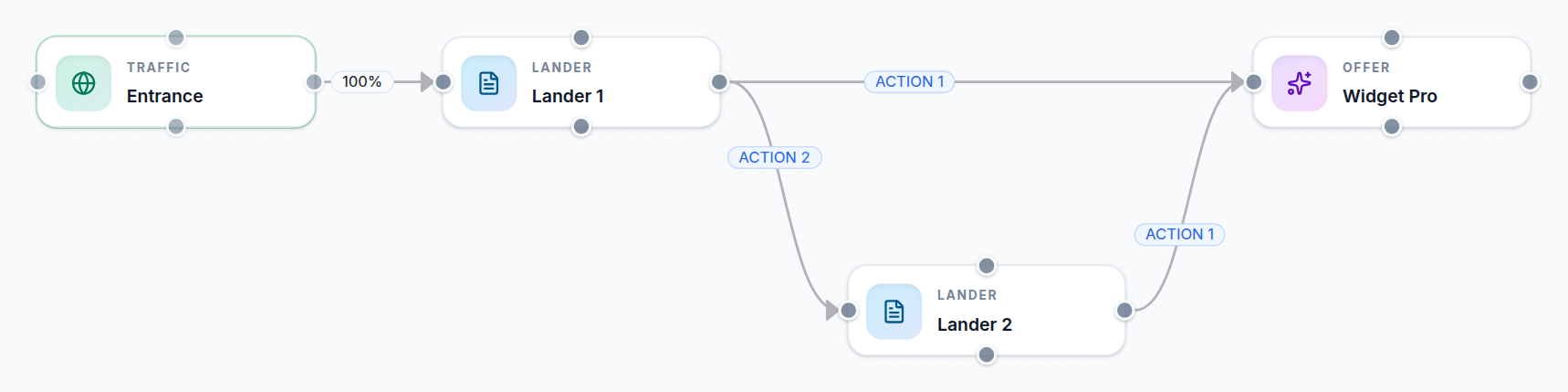
Visitors go to a lander, then an offer. The lander links straight to the offer, and also to a second lander that continues the sale, such as testimonials or a live demo, which links to the same offer. A normal sales site lets the visitor move back and forth between those pages. It does not trap them on one page.
One visitor’s path through that funnel:
- The visitor enters through the Entrance traffic node. That is 1 unique node view, and it is the entrance event.
- They load Lander 1. That is 1 unique node view, and a lander view.
- They click Action 1 on Lander 1. That is a unique lander click, and it takes them to Widget Pro: 1 unique node view and 1 offer view.
- They go back to Lander 1 and click Action 1 again. That click has already happened in this entrance, so it is a non-unique lander click. Widget Pro is a non-unique node view and a non-unique offer view.
- They go back to Lander 1 and click Action 2. That is a unique lander click, and Lander 2 is a unique node view that is also a lander view.
- They click Action 1 on Lander 2. That lander click is unique, because it has not happened before. Widget Pro has already been visited, so the node view and the offer view are non-unique.
If the visitor reloads the tracking link that sent them to the entrance node, they start a new entrance. It is non-unique. The node views inside it follow the same pattern as above.
Why you may see entrances and no clicks
Section titled “Why you may see entrances and no clicks”Entrances are visits into your funnels. Clicks are actions on your landers.
Some traffic sources do not require a click to send a visit to your funnel. Pop traffic and PPV traffic both trigger a visit without a click from the user. Calling those visits “clicks” is a mistake some trackers make.
In FunnelFlux, a click is a click on a lander. If you direct-link to an offer, there is no lander, and there is no click.
PPV traffic that redirects straight to an offer looks like this:
PPV traffic → FunnelFlux redirect → offerThe visitor did not click anywhere to reach the offer.
The same traffic with a lander looks like this:
PPV traffic → FunnelFlux redirect → landing page → click → offerEntrances are visits into the funnel. Clicks are the actions on the lander that move the visitor to the next step. In the flow above, that next step is the offer.
How lander and offer clicks work
Section titled “How lander and offer clicks work”Lander clicks and offer clicks come from action links on those nodes.
An action link looks like this:
https://tracker-domain.com/?flux_action=1Each load of that URL generates a lander click or an offer click. It is unique if the visitor has not clicked that action link on that node before, inside the current entrance.
Reloading the tracking link, landing on the lander again, and clicking through again produces two separate unique landing-page clicks, because they belong to two entrances.
Clicks are also unique when the action numbers differ. If a page has 4 action links and the visitor opens all of them in new tabs, each is a unique landing-page click, because each is a different action.
CTR is calculated from these lander and offer click-throughs. Use these action links to connect nodes.
Do not use a funnel entrance link as the call to action. This form starts a new entrance and does not log a click:
https://tracker-domain.com/?flux_fts=xxx&flux_ffn=xxxThat breaks tracking. Tracking-field data from the traffic source is stored on the funnel entrance. A new entrance can drop that custom field data, and downstream conversions then cannot be tied back to the traffic source.