

The features and functions of FunnelFlux's on-page Javascript tracking
For the basic setup, see Using the no-redirect feature. This page explains what the tracking script does and the options it accepts.
A basic breakdown
Section titled “A basic breakdown”The Universal tracking script defines the FunnelFlux tracking code in ffluxQuery(), sets the values FunnelFlux needs, then calls fflux.track().
Leaving out the body of ffluxQuery(), a script generated for a funnel node looks like this:
var fflux = new ffluxQuery();fflux.ffq('set', ['flux_url', fflux.getDocumentURL()]);fflux.ffq('set', ['flux_ref', fflux.getReferrer()]);fflux.ffq('set', ['flux_fn', 'NODE_ID']);fflux.track({ /* options, see below */ });That tracks the visit with the current page URL and referrer, against the node the script was generated for.
A script generated for a whole funnel sets flux_f (the funnel ID) instead of flux_fn.
FunnelFlux needs to know which node the visitor is on. It works that out in one of these ways:
flux_fn=NODE_IDin the page URL.flux_fnset in the script, used as the default node.- With only
flux_fset, it tries to match the page URL to a lander or offer in that funnel. - If it still can’t tell, it assumes the visitor is entering at the funnel’s traffic node.
Don’t set flux_fn and flux_f in the same script.
flux_fn already points at one node in one funnel.
Get the script for a node
Section titled “Get the script for a node”In the funnel editor, right-click a lander, offer or external URL node and choose Send Traffic Here. In the Funnel URL window, turn on Use direct tracking and copy the Universal tracking script.
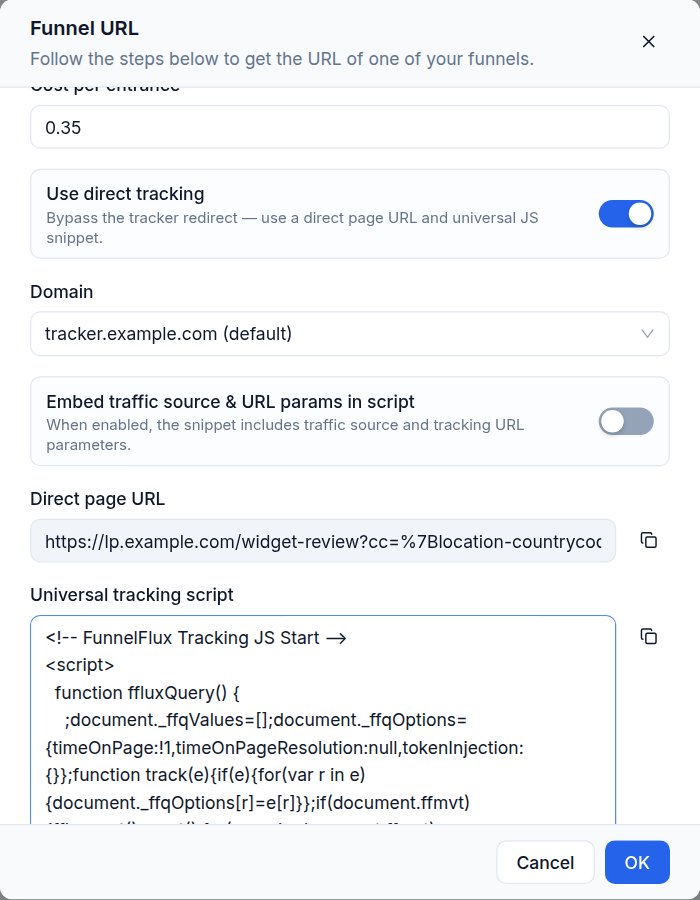
This script sets flux_fn, so it belongs to that node in that funnel.
If the same page is used in several funnels, use a funnel-level script instead (in the classic interface at /admin/, in the funnel’s JavaScript box) and pass flux_fn in the URL when you need a specific node.
Data you can embed as defaults
Section titled “Data you can embed as defaults”You can embed defaults in the JavaScript. FunnelFlux uses them when the URL does not already carry the value, and when it does not already know it from a tracking redirect.
In the Funnel URL window, select the traffic source and turn on Embed traffic source & URL params in script. The script then includes lines like these:
var fflux = new ffluxQuery();fflux.ffq('set', ['flux_fts', 'FTS_ID_HERE']);fflux.ffq('set', ['subid', '[IMPRESSIONID]']);fflux.ffq('set', ['publisher', '[WEBSITEID]']);fflux.ffq('set', ['campaign', '[CAMPAIGNNAME]']);fflux.ffq('set', ['flux_url', fflux.getDocumentURL()]);fflux.ffq('set', ['flux_ref', fflux.getReferrer()]);fflux.ffq('set', ['flux_fn', 'NODE_ID']);fflux.track({ /* options */ });flux_fts is the traffic source.
The other lines are traffic-source parameters with their default tokens.
If someone loads the page organically, FunnelFlux uses that traffic source and those default URL fields.
This script also sets flux_fn, so the visit defaults to that node in the funnel you generated it from.
FunnelFlux still reads the URL. If the same parameter names are in the URL, those values override the defaults in the script.
For this URL:
https://lander.com/index.php?subid=123&publisher=456&campaign=789FunnelFlux sends 123, 456, and 789, because they use the subid, publisher, and campaign names the script is expecting.
Updating tracking fields from the page
Section titled “Updating tracking fields from the page”If a traffic source has a custom field you want to fill from something the visitor does on the page, you can update it with a PHP node or with the on-page JavaScript.
Example: the traffic source has a gender field.
The source itself cannot pass it, but you want the value stored and available in reports.
The lander has a survey where the visitor picks a gender, and you write that choice onto the visit.
Call the update function, then call track again:
fflux.ffq('update', ['fieldname', 'new-value']);fflux.track();Wrap that in a function and call it when you need the update.
This survey sets the choice, then sends it when the visitor clicks next:
<div id="survey">    <button onClick="chooseGender('male')">I am male</button>    <button onClick="chooseGender('female')">I am female</button>    <button onClick="updateGender()">NEXT QUESTION</button></div>
<script>var gender;function chooseGender(choice){    gender = choice;}
function updateGender(){fflux.ffq('update', ['gender', gender]);fflux.track();}</script>
That pattern works for any tracking field on the current traffic source. You can run it more than once if you need to change a value that is already set.
It does not work for organic traffic, because organic traffic has no fields defined.
Create a traffic source, for example one named “Organic Traffic”, and define the fields there.
Generate the no-redirect JavaScript for that traffic source and embed it on the lander with flux_fts set, so that source is the default.
Options for fflux.track()
Section titled “Options for fflux.track()”The Universal tracking script ends with a call like this:
fflux.track({ timeOnPage: false, timeOnPageResolution: 3000, noCookies: false, tokenInjection: { intoUrl: false, intoForms: { selector: null }, intoLinks: { selector: null }, tokens: {} }});timeOnPage and timeOnPageResolution
Section titled “timeOnPage and timeOnPageResolution”With timeOnPage: true, the script pings the tracker to record how long the visitor stays on the page.
timeOnPageResolution is the interval between pings, in milliseconds.
See Time on page tracking.
noCookies
Section titled “noCookies”With noCookies: true, the script tracks without cookies.
Use this when the page cannot set cookies, or something blocks them, for example:
- an in-app browser that blocks third-party cookies, so clickthroughs show up as organic traffic
- the tracker and the action links use different domains (avoid this when you can)
- the visitor’s browser blocks cookies
- you want to track without cookies, including where you want to avoid a cookie-consent prompt under GDPR
Cookieless tracking passes the session ID between pages instead. See Using cookieless tracking and Create smooth tracking using session ID.
tokenInjection
Section titled “tokenInjection”Token injection writes values into the page URL, forms or links. Cookieless tracking uses it, and so do the ClickBank and ClickFunnels setups.
intoUrl
Section titled “intoUrl”true or false.
When true, the script updates the current page URL with the values you list under tokens.
The page does not reload.
intoForms
Section titled “intoForms”Off by default (selector: null).
Pass a form selector and the script adds the token values as hidden fields on submit.
Every form:
intoForms: { selector: 'form' }A form with the class some-class:
intoForms: { selector: 'form.some-class' }intoLinks
Section titled “intoLinks”Pass a selector such as a or a.flux_cta.
The script finds those links and appends the token values as URL parameters.
That is how session IDs move between pages in cookieless tracking. It also lets you link pages without action links, because the next page’s script can read who the visitor is from the URL.
tokens
Section titled “tokens”This is the list of names and values to inject into the URL, forms, or links.
tokens: { vtid: '{hit-id}', cbf: '[[cbf]]' }The ClickBank method uses this to pass vtid=xxx&cbf=yyy into links to the next pages.
This link:
<a href="http://someurl.com/">Some link</a>is rewritten to:
<a href="http://someurl.com/?vtid=xxx&cbf=yyy">Some link</a>On a form, the submit includes vtid = xxx and cbf = yyy as extra fields.
Another example:
tokens: { hitid: '{hit-id}', funnel: '{funnel-id}' }With intoUrl set to true, loading:
http://someurl.com/lander/changes the address bar, without a reload, to:
http://someurl.com/lander/?hitid=xxxxxxxxx&funnel=xxxxxxxxxxCookieless tracking uses the same technique to put the session ID in the URL, so later action links and pages can see it in the referrer.
If a value is already in the URL, you can pass it on by wrapping the parameter name in double square brackets.
After loading:
http://someurl.com/lander/?some-param=bananathis sends banana onward:
tokens: { 'fav-fruit': '[[some-param]]' }Other functions on the page
Section titled “Other functions on the page”The tracking script also gives you these helpers:
fflux.getURLParams()returns an object with every query-string parameter of the page.fflux.getURLParam(key)returns one parameter.fflux.getDocumentURL()returns the page URL. Inside an iframe, it merges in the parameters of the top page’s URL.fflux.getReferrer()returns the referrer, taken from the top page when the script runs in an iframe.
For this lander URL:
https://lander.com/index.html?key1=banana&key2=applefflux.getURLParam('key1') returns banana.
fflux.getURLParam('key2') returns apple.
Put the FunnelFlux script at the top of the page, in <head>, so these functions exist before any code calls them.
Any script that calls them must come after the FunnelFlux script.