

Redirect users from one funnel to another
Scenario
Section titled “Scenario”You are sending traffic to funnel A. You build funnel B and want all funnel A traffic to go to funnel B instead, without changing the links at the traffic source.
Send traffic to another funnel
Section titled “Send traffic to another funnel”Connect the Entrance node of funnel A to a PHP node. Put this code in the PHP node:
<?php
require_once 'PHPNodeHelpers.php';
$trackingFields = PHPNodeHelpers::loadTrackingFields();$currentTrafficSourceId = '{trafficsource-id}';$targetFunnelId = '[[target-funnel-id]]';
$queryParams = $trackingFields;$queryParams['flux_fts'] = Crypter::fastEncodeDigits( [$targetFunnelId, $currentTrafficSourceId] );$url = 'https://{flux-domain}/?'.http_build_query($queryParams);Permalinks::fastRedirect( $url );
?>
The code builds an entrance link for funnel B with the same traffic source and the visitor’s tracking fields, then redirects the visitor to it.
{flux-domain} is the tracking domain the visitor arrived on.
The samples use https://, so your tracking domain needs SSL.
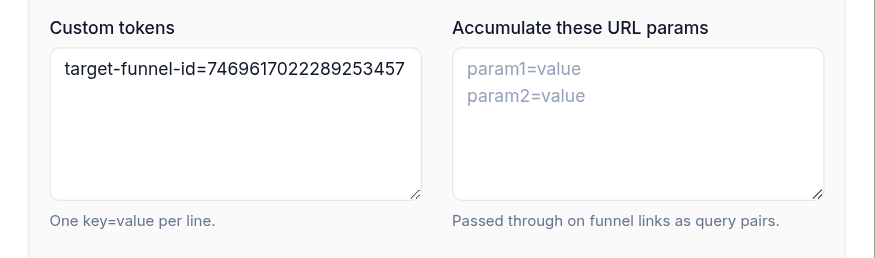
Set the ID of funnel B as a custom token in funnel A. Open funnel A’s settings, expand Advanced settings and add this line under Custom tokens, with your funnel B ID:
target-funnel-id=FUNNEL_B_IDThe funnel ID is shown in the Funnel ID field of funnel B’s settings.
You can also write the ID in the code instead of [[target-funnel-id]], but the custom token keeps the same code reusable.
Send traffic to a specific node
Section titled “Send traffic to a specific node”To start visitors at a specific node of funnel B instead of its Entrance node, add the node ID as flux_fn:
<?php
require_once 'PHPNodeHelpers.php';
$trackingFields = PHPNodeHelpers::loadTrackingFields();$currentTrafficSourceId = '{trafficsource-id}';$targetFunnelId = '[[target-funnel-id]]';$targetNodeId = '[[target-node-id]]';
$queryParams = $trackingFields;$queryParams['flux_fts'] = Crypter::fastEncodeDigits( [$targetFunnelId, $currentTrafficSourceId] );$queryParams['flux_fn'] = $targetNodeId;
$url = 'https://{flux-domain}/?'.http_build_query($queryParams);Permalinks::fastRedirect( $url );
?>
Add target-node-id=NODE_ID to the custom tokens in the same way.
To find the node ID, open funnel B in the funnel builder, right-click the node and click Send Traffic Here.
The Node field in the Funnel URL window starts with the node ID, followed by the node type and name.
If one funnel needs several of these PHP nodes, each with a different target, write the funnel ID and node ID directly in each node’s code instead of using custom tokens.
Crypter and Permalinks are internal FunnelFlux classes that are already loaded when a PHP node runs.
Crypter::fastEncodeDigits builds the flux_fts value from the funnel ID and traffic source ID.
Permalinks::fastRedirect sends a 307 redirect by default and adds the visitor’s current URL parameters to it.