

How to configure tracking in a lander/offer with many action links
Pages that link out to many offers are common. So are pages with several calls to action that should be tracked separately, even when they go to the same destination. Separate actions let you compare click-through rate and conversion rate by position.
FunnelFlux allows up to 64 actions from any lander or offer. Referrer handling is the part to get right.
Referrer
Section titled “Referrer”The tracker must be able to see that the click was referred from the lander that holds the many links. If it cannot, it cannot tell which node the click belongs to.
Consider this funnel:
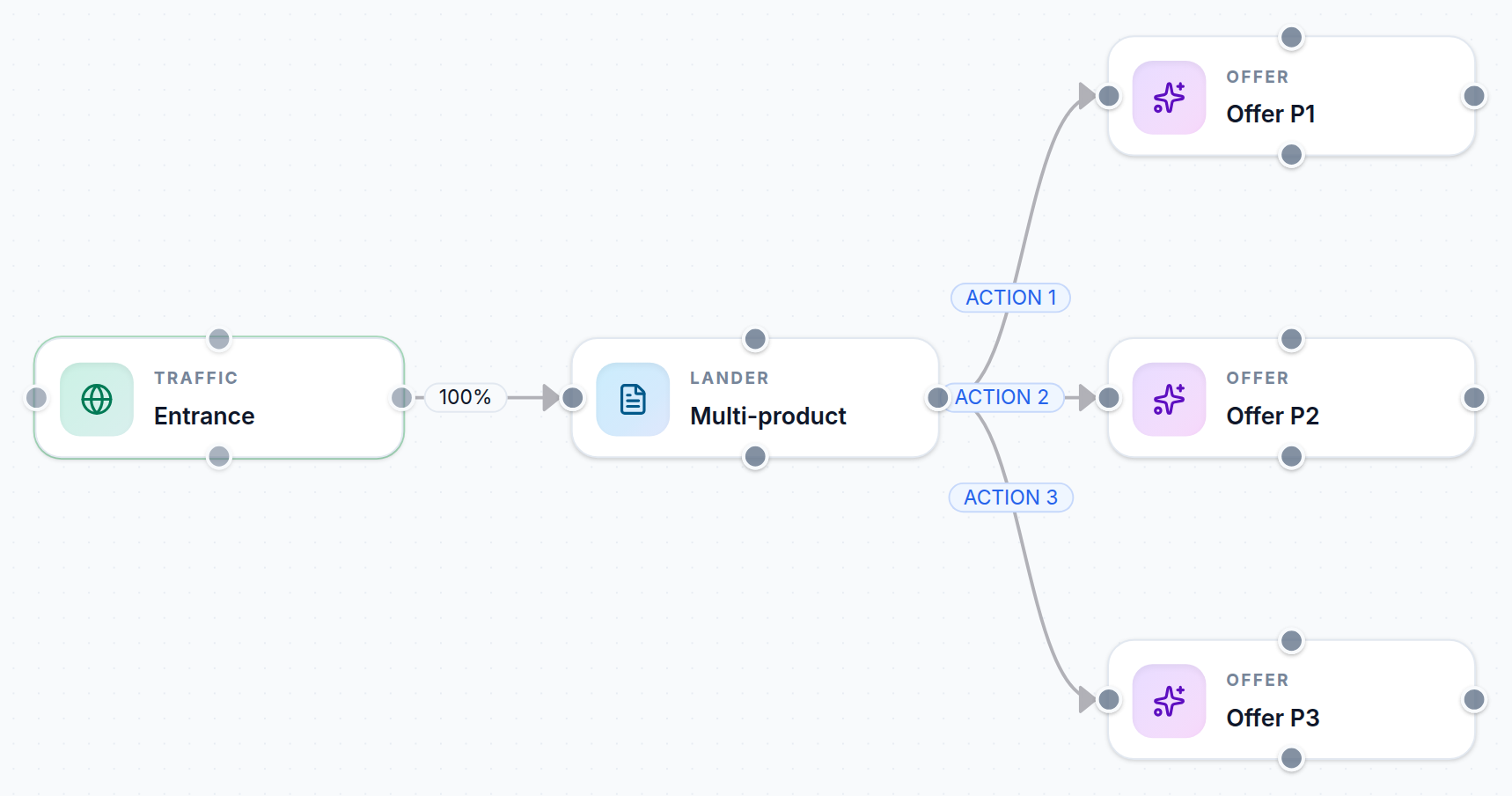
When a visitor reaches the first “Multi-product” lander and clicks an action, the tracker moves them to a new node even if that link opens in a new tab. They load one of three offers:
- Offer P1
- Offer P2
- Offer P3
Those offers may have opened in a new tab. The visitor can go back to the Multi-product lander and click action 1, action 2 or action 3 again.
The last node the visitor reached is now one of the offers, and none of them has an action 1 connection. If the tracker only looked at the most recent node, a second click on the universal action 1 URL would return a 404.
The tracker tells these cases apart by the referrer on the click. The referrer shows whether the click came from a lander the visitor has already been on, rather than from the most recent node they reached.
That is why you must not block the referrer on multi-action pages used this way.
Best practices
Section titled “Best practices”Do not use rel="noreferrer" on any action link.
Blanking the referrer you send to your own tracker has no benefit.
There is also no reason to use the UMR (Meta Refresh) redirect mode on a landing page or offer that you own and control.
Do not send the visitor from HTTPS to HTTP. Browsers generally strip the referrer when a secure page links to an insecure URL.
Use HTTPS for tracking links, action links, and the rest of the tracker. Cloudflare can issue that HTTPS, and it can also improve performance.
Use the same domain throughout. If tracking links or the JavaScript source use one domain and action links use another, the visit is disconnected. Referrer problems are the smaller issue in that case.
Some browsers block referrers in every case. Firefox Private Browsing is one example.
To keep multi-action pages working in those cases, inject the hit ID into the action URLs. See how to pass the hit ID so tracking stays connected.