

Using FunnelFlux's time on page tracking
FunnelFlux on-page JavaScript can record how long a visitor spends on a lander or offer page.
To read it, open Stats > Drilldown (Tree) or Drilldown (Flat) and group by Time on Page or Time on Page Segments, under Insight.
The classic /admin/ reports call these groupings Insight: Time on Page and Insight: Time on Page Segments.
How it works
Section titled “How it works”The on-page JavaScript includes a time-on-page function. It sends data to your FunnelFlux server when the visitor unloads the page, using beacons.
On older browsers it also sends updates every X seconds, based on your time resolution setting. That is a fallback for browsers that do not support beacons.
The time tracker pauses if the visitor changes tab.
Implementation
Section titled “Implementation”This tracking uses the on-page JavaScript from the no-redirect tracking method.
To get the code, right-click a lander in your funnel and click Send Traffic Here. In the Funnel URL window, turn on Use direct tracking and copy the Universal tracking script.
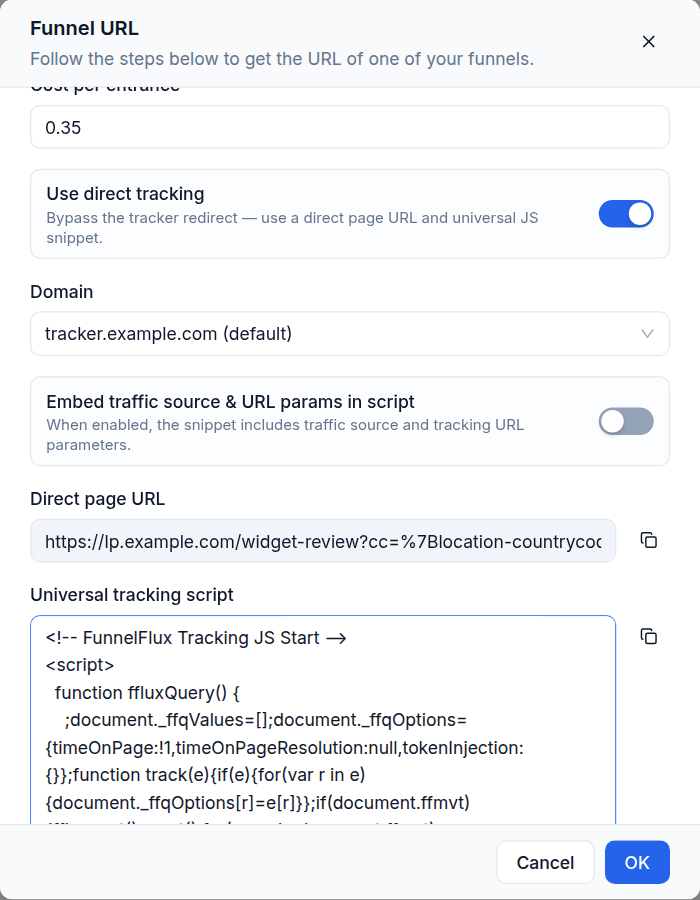
Paste the code on your landing page.
It works in <head> or <body>.
Turn time-on-page tracking on by changing timeOnPage: false to timeOnPage: true in the fflux.track call at the end of the script:
fflux.track({ timeOnPage: true, timeOnPageResolution: 3000, noCookies: false, tokenInjection: { intoUrl: false, intoForms: { selector: null }, intoLinks: { selector: null }, tokens: {} }});When the page loads, the JavaScript waits until HTML loading is complete, then starts recording time on page.
You can keep using redirect-based tracking and add this JavaScript on your landers.
The two do not conflict. The JavaScript does not record a duplicate lander view, and it does not overwrite visitor data with defaults declared in the JavaScript. URL parameters take priority. Those are the parameters passed in the FunnelFlux tracking link that redirected to the lander.
Legacy functions and parameters
Section titled “Legacy functions and parameters”The main parameter that affects time tracking in older browsers is timeOnPageResolution.
Change the resolution
Section titled “Change the resolution”Set the resolution, in milliseconds, with timeOnPageResolution in the same fflux.track call.
The script ships with timeOnPageResolution: 3000 (three seconds).
Change it to 2000 to push updates every two seconds.
You can also override it in the URL:
http://url.com/page.html?flux_topres=5000The URL overrides the JavaScript parameters.
This only works on old browsers that do not support sendBeacon.
For most traffic, these legacy functions do not matter.