

Setting up Multivariate Testing (MVT) with Javascript
This page explains how to set up multivariate testing on HTML pages with the FunnelFlux on-page JavaScript. The page can be on any domain or host, including a CDN.
For what multivariate testing is, see What is multivariate testing.
Get the tracking script
Section titled “Get the tracking script”Put the FunnelFlux tracking script on the lander or offer. In the funnel editor, use Send Traffic Here on the lander or offer node, turn on Use direct tracking, and copy the Universal tracking script. Using the no-redirect feature explains the options.
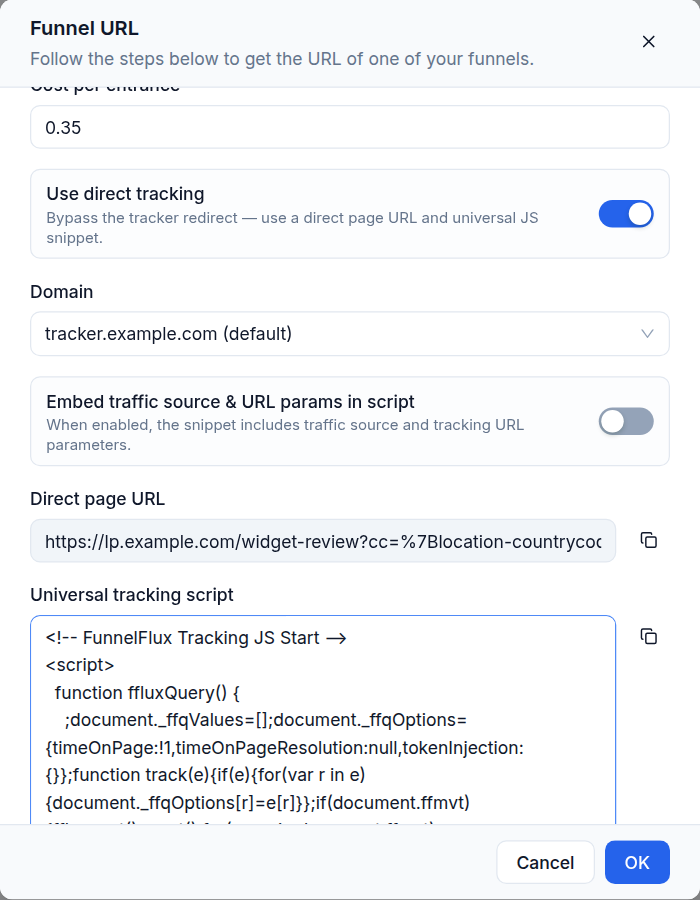
The script looks like this.
The samples on this page shorten the body of ffluxQuery() so the MVT lines are easy to see.
Always paste the full script FunnelFlux gives you.
<!-- FunnelFlux Tracking JS Start --><script> function ffluxQuery() { /* FunnelFlux tracking code, shortened here */ } var fflux = new ffluxQuery(); fflux.ffq('set', ['flux_url', fflux.getDocumentURL()]); fflux.ffq('set', ['flux_ref', fflux.getReferrer()]); fflux.ffq('set', ['flux_fn', 'NODE-ID']); fflux.track({ /* tracking options */ });</script><!-- FunnelFlux Tracking JS End -->Add variations
Section titled “Add variations”Add your variations with fflux.mvt().add(key, value), then call fflux.mvt().process().
Both must come before fflux.track(...), so the chosen variations are sent with the visit:
<!-- FunnelFlux Tracking JS Start --><script>  function ffluxQuery() {    /* FunnelFlux tracking code, shortened here */  }  var fflux = new ffluxQuery();  fflux.ffq('set', ['flux_url', fflux.getDocumentURL()]);  fflux.ffq('set', ['flux_ref', fflux.getReferrer()]);  fflux.ffq('set', ['flux_fn', 'NODE-ID']);
  fflux.mvt().add('heading', 'Best Shoes Ever!');  fflux.mvt().add('heading', '#1 Product');  fflux.mvt().add('image', 'image01.jpg');  fflux.mvt().add('image', 'image02.jpg');  fflux.mvt().add('image', 'image03.jpg');  fflux.mvt().add('cta', 'Buy NOW!');  fflux.mvt().add('cta', 'Get one NOW!');  fflux.mvt().add('cta', 'Purchase a Pair NOW!');  fflux.mvt().add('background', '#ff0000');  fflux.mvt().add('background', '#008000');  fflux.mvt().process();
fflux.track({ /* tracking options */ });</script><!-- FunnelFlux Tracking JS End -->heading, image, cta and background are example keys.
Name the keys after what you are testing; the keys and values appear in drilldown reports.
By default, a visitor sees the same combination on every visit and refresh.
The script remembers the visitor with a first-party cookie (mvt-vid) that lasts 30 days.
To pick a new combination on every page load, including refreshes, use:
fflux.mvt().process('always');Show the variations on the page
Section titled “Show the variations on the page”The MVT script picks the variations and records which ones were chosen. Your page code has to display them.
Read the chosen value for a key with fflux.mvt().get(key):
var heading = fflux.mvt().get('heading');Give each element that shows a variation a unique id, then set it from JavaScript after the tracking script.
Text inside an element, such as a heading, is its innerHTML:
<h1 id="my-title">My Lander Title</h1><script> document.getElementById('my-title').innerHTML = fflux.mvt().get('heading');</script>An image path is the src attribute:
<img id="my-image" src="my-image.png" alt=""><script> document.getElementById('my-image').src = fflux.mvt().get('image');</script>CSS properties are set through style:
<a id="my-link" href="https://yourdomain.com/?flux_action=1" style="background-color:#000; color:#fff">Link Text</a><script> document.getElementById('my-link').style.backgroundColor = fflux.mvt().get('background');</script>In JavaScript, CSS property names drop the hyphen and capitalise the next letter.
background-color becomes backgroundColor, and background-position becomes backgroundPosition.
Full example
Section titled “Full example”This page puts the four examples together. Replace the shortened script with the one from your funnel.
<!DOCTYPE html><html><head><meta charset="utf-8"><title>Landing 1</title><style>body { font-family: Arial, sans-serif; font-size: 12px; text-align: center; }</style></head><body><h1 id="heading"></h1><img id="image" alt=""><p><a id="cta" href="https://yourdomain.com/?flux_action=1" style="border-radius:2px; display:inline-block; padding:10px 20px; font-size:24px; text-decoration:none; color:#fff"></a></p>
<!-- FunnelFlux Tracking JS Start --><script>  function ffluxQuery() {    /* FunnelFlux tracking code, shortened here */  }  var fflux = new ffluxQuery();  fflux.ffq('set', ['flux_url', fflux.getDocumentURL()]);  fflux.ffq('set', ['flux_ref', fflux.getReferrer()]);  fflux.ffq('set', ['flux_fn', 'NODE-ID']);  fflux.mvt().add('heading', 'Best Shoes Ever!');  fflux.mvt().add('heading', '#1 Product');  fflux.mvt().add('image', 'image01.jpg');  fflux.mvt().add('image', 'image02.jpg');  fflux.mvt().add('image', 'image03.jpg');  fflux.mvt().add('cta', 'Buy NOW!');  fflux.mvt().add('cta', 'Get one NOW!');  fflux.mvt().add('cta', 'Purchase a Pair NOW!');  fflux.mvt().add('background', '#ff0000');  fflux.mvt().add('background', '#008000');  fflux.mvt().process();  fflux.track({ /* tracking options */ });</script><!-- FunnelFlux Tracking JS End -->
<script>  document.getElementById('heading').innerHTML = fflux.mvt().get('heading');  document.getElementById('image').src = fflux.mvt().get('image');  document.getElementById('cta').innerHTML = fflux.mvt().get('cta');  document.getElementById('cta').style.backgroundColor = fflux.mvt().get('background');</script></body></html>
Report variations chosen by another tool
Section titled “Report variations chosen by another tool”Tools such as Visual Website Optimizer or Instapage can run the split test themselves. You can still send the chosen variations to FunnelFlux so reports can break down by them.
Don’t add fflux.mvt() lines to the FunnelFlux script in this case.
Instead, set document.ffmvt before the FunnelFlux script runs, with one value per key:
<script> document.ffmvt = {}; document.ffmvt["header-variant"] = "header1.html"; document.ffmvt["video-variant"] = "JPAT11RYWPY"; document.ffmvt["cta"] = "GET STARTED NOW FOR JUST $1";</script>That example reports a header, a YouTube video ID and call-to-action text.
When the FunnelFlux script tracks the visit, it reads document.ffmvt and records those values.
If the other tool injects code per variation in its visual editor, put the matching keys and values in each variation.
If the other tool picks the variation in its own JavaScript, set document.ffmvt after that code and before the FunnelFlux script:
<script> document.ffmvt = {}; document.ffmvt["some_attribute"] = some_mvt_var; document.ffmvt["another_attribute"] = some_function().get('mvt_var');</script>PHP MVT with JavaScript tracking
Section titled “PHP MVT with JavaScript tracking”You can also generate the variations in PHP, so the HTML is complete before the browser renders it.
If the visitor arrives without a FunnelFlux tracking link, PHP can print the variations but can’t record them, because the visitor isn’t tracked until the on-page JavaScript runs.
The PHP script’s sendToJS option hands the variations to the JavaScript, which records them.