

How to set incoming traffic costs
FunnelFlux has more than one place where you can set a cost for traffic. This page covers the cost applied as traffic arrives. It is not Cost Updates in the Updates menu, which changes cost on hits you have already logged.
There are three places that affect cost:
- The
flux_costparameter in the URL - Incoming traffic cost overrides in a funnel’s Advanced settings
- Cost Updates in the Updates menu, which apply to historic data, not to traffic as it enters
flux_cost is added to a generated URL only when a default cost is set.
Without a default, the parameter would add nothing useful.
Using the flux_cost parameter
Section titled “Using the flux_cost parameter”You can set a default cost on the traffic source, and on a specific funnel. To set the funnel default, open the funnel, click the settings (gear) icon, and fill in Default cost per entrance.
Those defaults do not write the cost onto incoming hits themselves.
They set the flux_cost value on the links you generate for a funnel.
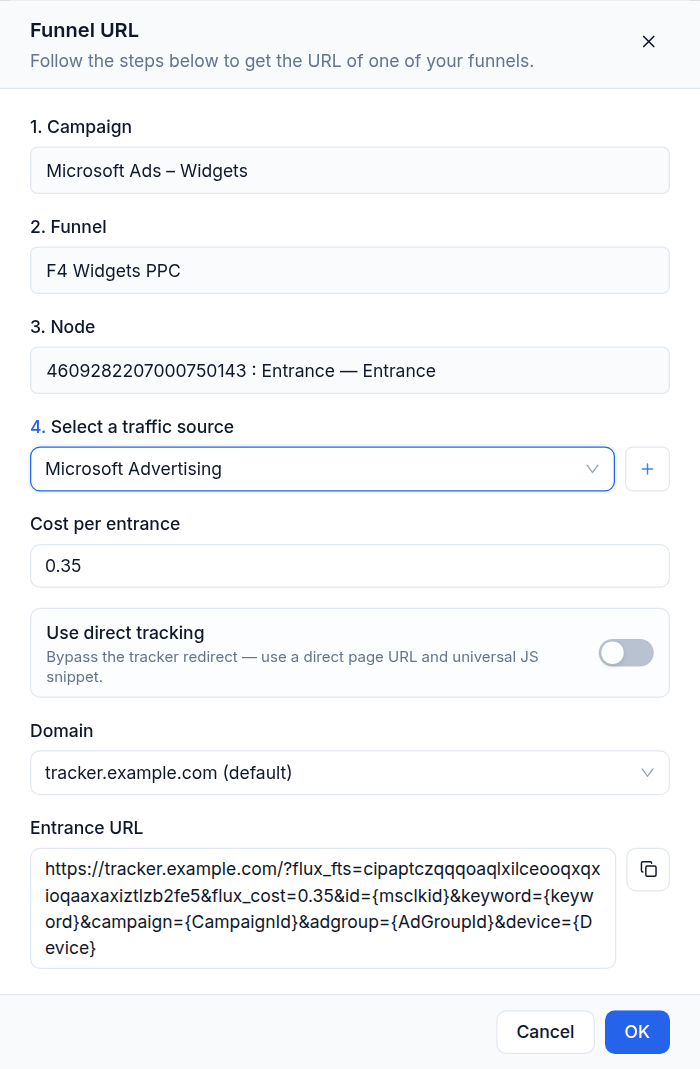
Open a funnel, right-click a node, and choose Send Traffic Here.
The window that opens is Funnel URL.
When you change the traffic source, the cost box (Cost per entrance, or Cost per action for CPA sources) changes, and the flux_cost parameter in the generated URL changes with it.
You can also type a different cost in that box before you copy the link.
If the funnel has its own default cost, that value takes priority over the traffic source default.
Using incoming traffic cost overrides
Section titled “Using incoming traffic cost overrides”You can also add cost to incoming hits with overrides. Open the funnel, click the settings (gear) icon, and expand Advanced settings. Under Incoming traffic cost overrides, click Add override and enter the traffic source ID and the cost.
These overrides are separate from the flux_cost parameter.
They have the highest priority, including over a flux_cost value already in the URL.

Overrides let you change the cost of new hits without changing the URLs already in your campaigns. Changing a live URL can disrupt the campaign and ad delivery.
Overrides apply to future hits after you save the funnel.
Change an override to update the cost on new hits.
Delete it to fall back to the flux_cost value in the URL.
You can still use Cost Updates later to change cost on historic traffic.